DT1DN1Digiemu - A Digitakt and Digitone Emulator
#1
Status: Stable
What it does
An emulator (with gui) for the Digitakt and Digitone Mk1. Bring your own syx file.  
Features
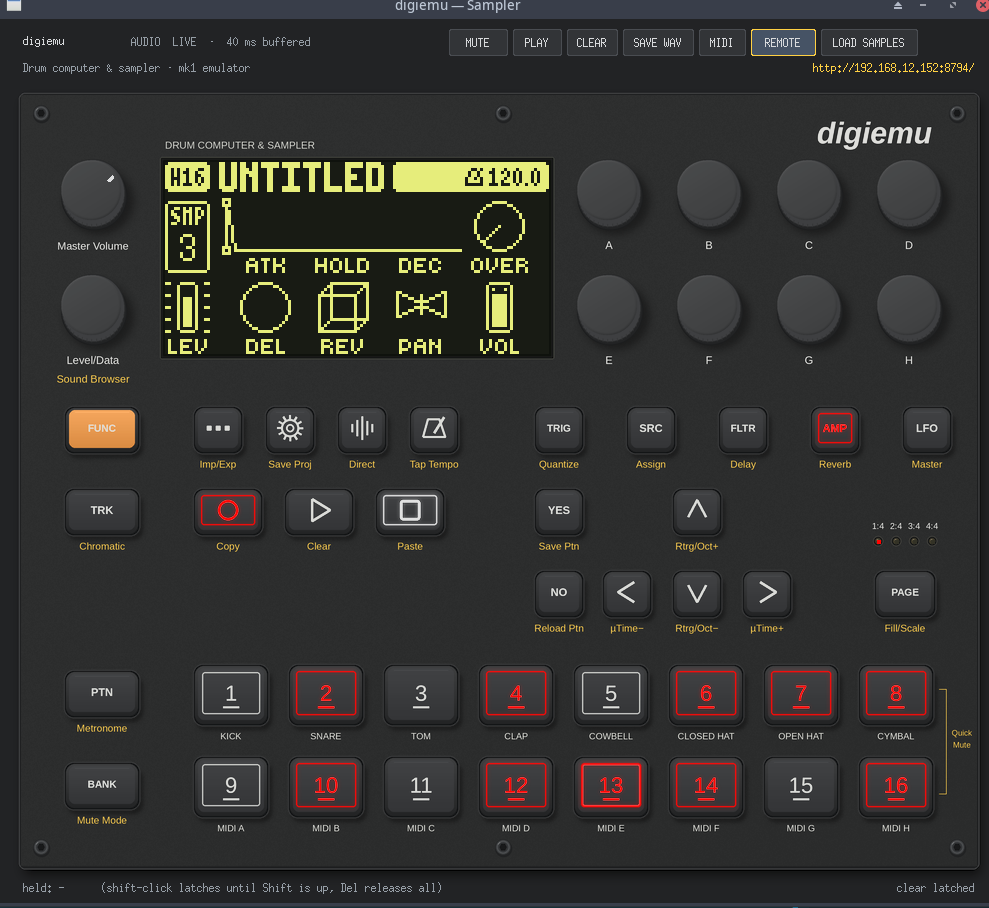
  • Full speed emulation 
  • Emulated +Drive 
  • Debug features for developing elekloader mods. 
Demo
Screenshot 2026-09-30 185957.png
Known issues / limitations
  • Slow on Apple silicon?
Compatibility
Works on Windows, Linux, and MacOs
Risks and disclaimer
Custom firmware is unofficial and not supported by Elektron. Back up first and use at your own risk. 
Feedback wanted
If you run into performance issues please list your build. 

If you have any suggestions please feel free to leave them below or contribute a PR yourself Smile
Elektron Digitakt, Digitone (mk1), Model:Cycles and Model:Samples emulator: runs their own firmware behind a clickable front panel, with live audio and MIDI. Apps for Windows and Apple silicon Macs; bring your own .syx. Unofficial.Python91
GitHub
got dat dawg in me || buy me a coffee  Heart  
[Image: iNieMXB.png]
Find Likes5
Reply
#2
Awesome project Smile but it fail setting up on latest DN FW : (
Reply
#3
Is this a stand alone version that will run on just a computer, without the hardware?

I am seeing it should work on Mac, but only see a Windows .exe version?

Also it seems like the latest firmware is 1.44, which is the only one available on Elektron site and this needs 1.43. The firmware on Elektron webside has JUST been updated today, 1. of October, so 1.43 is no longer available...... Sad

Anyway, look forward to try this, keep up the nice work Smile
Reply
#4
(10-01-2026, 06:22 PM)Jaffasplaffa Wrote: Is this a stand alone version that will run on just a computer, without the hardware?

I am seeing it should work on Mac, but only see a Windows .exe version?

Also it seems like the latest firmware is 1.44, which is the only one available on Elektron site and this needs 1.43. The firmware on Elektron webside has JUST been updated today, 1. of October, so 1.43 is no longer available...... Sad

Anyway, look forward to try this, keep up the nice work Smile

FW's are on this site  Wink
Find Likes1
Reply
#5
(10-01-2026, 06:22 PM)Jaffasplaffa Wrote: Also it seems like the latest firmware is 1.44, which is the only one available on Elektron site and this needs 1.43. The firmware on Elektron webside has JUST been updated today, 1. of October, so 1.43 is no longer available...... Sad

you can still download from elektron.se. just hidden. here all hidden download links.

Elektron Firmware - Download List
Find Likes1
Reply
#6
Looks very cool!
I see the post says it’s compatible with macOS but can’t find the right release on the git. 
I’d happily give it a test and provide some feedback, will it be available anytime soon?
Reply
#7
(10-02-2026, 06:07 PM)S_PlaysMusic Wrote: Looks very cool!
I see the post says it’s compatible with macOS but can’t find the right release on the git. 
I’d happily give it a test and provide some feedback, will it be available anytime soon?

I will probably get this taken care of this weekend. I hate busting out my mac X)
got dat dawg in me || buy me a coffee  Heart  
[Image: iNieMXB.png]
Find Likes3
Reply
#8
Mac Release now Available
got dat dawg in me || buy me a coffee  Heart  
[Image: iNieMXB.png]
Find Likes3
Reply
#9
(10-03-2026, 08:07 PM)pina Wrote: Mac Release now Available

That was fast! 
Thank you so much, can’t wait to give it a try
Reply
#10
Hi! Is anyone else having audio drop outs issue? I run this digiemu on intel core i9 (Windows 10) and the audio is constantly crackling and glitching.
The top bar of the UI shows an increasing number of dropouts, even though my CPU usage in Windows Task Manager is only around 15%. I am running the compiled standalone version (built with Python 3.11 inside the _internal folder), and I couldn't find any .ini or .json configuration files in the directory to manually increase the audio buffer size or change the audio driver to ASIO.
I have already tried matching my Windows system sample rate to the native 48,000 Hz (using my Elektron Analog Rytm as the audio interface), but the crackling persists and the buffer seems stuck at around 20 ms.
Is there a hidden config file somewhere (e.g., in AppData), or any command-line arguments I can pass to digiemu.exe to increase the buffer size (like 512 or 1024 samples) or force it to use an ASIO driver? Any help would be greatly appreciated!
Reply


Forum Jump:


Users browsing this thread:


User Profile Send Private Message E-mail Find all posts Find all threads Mod Tools Admin Tools