
Monomodule for MPC OS
Monomodule (Monomachine DSP56300 emulation) as an Akai Force/MPC OS VST2 plugin, via mpc-vst-plugins
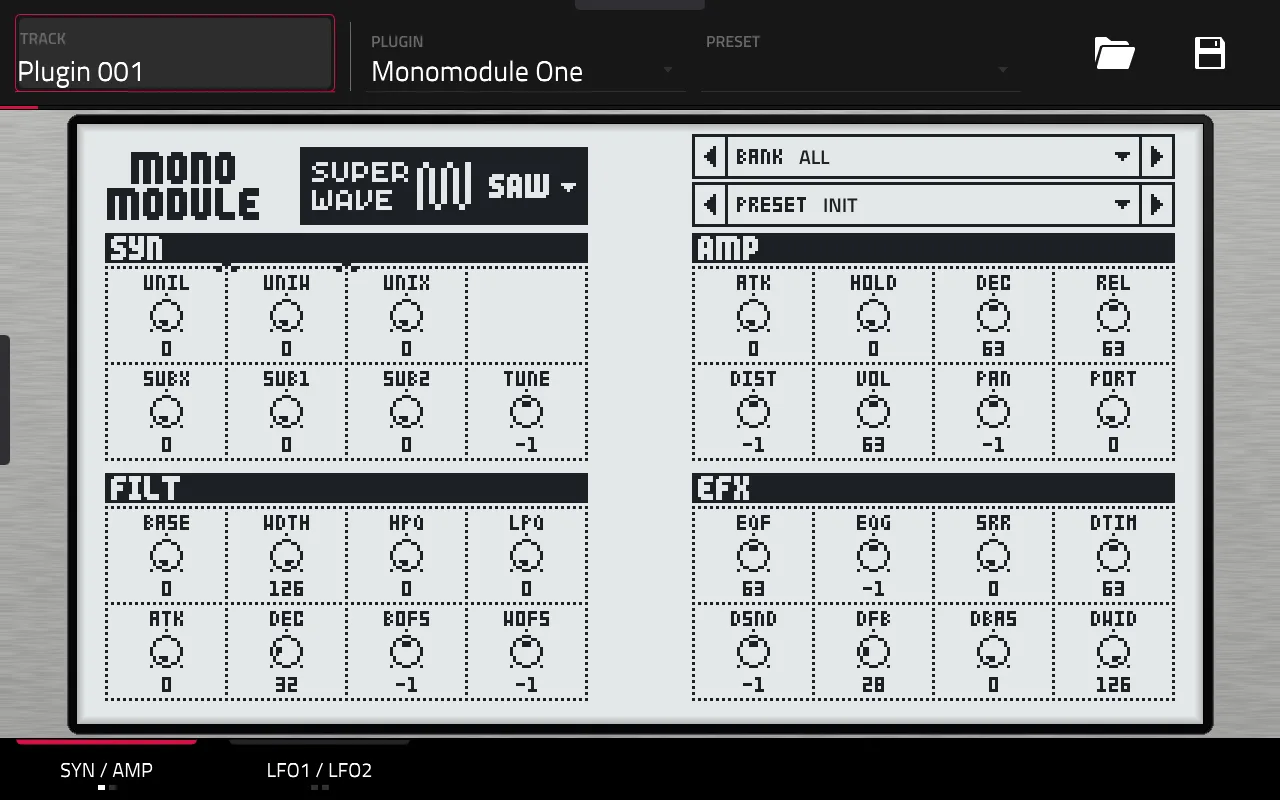
About
Highlights
- Monomodule One: 15 synth machines as an instrument
- Monomodule FX: 7 effect machines as an insert effect
- Touchscreen skins with the original LCD art, plus Q-Link support
- Presets from your kit .syx dumps, factory bank extracted from your own OS file
- Bit-exact against the desktop emulator on all 22 machines
What you need
A first-generation (32-bit) MPC OS standalone device (Force, MPC Live / Live II, One, X or Key 61) with root SSH access and MPC OS 3.x, your own Monomachine OS file (tested with 1.32B), and a macOS or Linux computer with Docker to build the installer.
Good to know
There is no downloadable build: every build is made from your own OS file and must not be shared. Tested on an Akai Force with MPC OS 3.9.1, other devices are untested. Installing plugins this way is unofficial, so back up first. Problems with the port go to this repository, not to shnolk.
README
Monomodule for MPC OS
💬 Questions or feedback? Join the Open MPC Discord.
Requires MPC OS 3.x. MPC OS 2.x needs further development: the touchscreen skins do not draw there yet (the page stays empty). See MPC OS 2.x vs 3.x in the main repo.
Monomodule — a chip-accurate emulation of the Elektron Monomachine's synth engine — as native VST2 plugins for Akai MPC OS standalone devices (MPC Live/One/X/Key, Force). Monomodule One is the instrument (15 synth machines); Monomodule FX is the same engine's 7 effect machines as an audio effect. Both load in MPC's built-in plugin host with their own touchscreen skins and Q-Link support.
Current release: v0.10.2 — no downloadable build (see "Install" below for why); build it yourself
from your own OS file with release/release.sh (one command; release/build_from_os.sh is its build step).
An MPC port by sd88me of shnolk's Monomodule engine (all credit for the emulation to shnolk; see Credits). Listed in MPC under the manufacturer sd88me, since shnolk neither makes nor supports this port: report problems here, not to shnolk. Not affiliated with Elektron or with shnolk. Requires your own Monomachine OS file (see below); nothing of Elektron's is included or distributed.
New in 0.10.2: a reloaded project, clip or autosampler pass keeps your sound. MPC probes the machine parameter (sets another value, then straight back) around project load, clip play and the autosampler, and each machine change reset the pages, wiping the restored patch. The plugin now puts the replaced sound back when its machine returns within half a second.
New in 0.10.1: saving and reloading now keeps your patch. Before, a saved MPC project, program or plugin preset came back as the Init sound, because the plugin never handed MPC its state. It now stores every knob, the machine, the preset and bank selection, so a reload restores the sound exactly.
New in 0.10.0: the plugins are listed under the manufacturer sd88me (they were listed as shnolk, who wrote the engine but
doesn't make or support this port). Installing renames your old shnolk - VST - Monomodule One/FX folders, so your kit dumps are
kept, and replaces the plugin-list entries. The skin no longer carries shnolk's logo: the header reads MONO MODULE and the machine
selector lines up with the SYN page.
Why this exists
The Monomachine's sound comes from a Motorola DSP56300 chip, and Monomodule emulates it instruction
by instruction — accurate, but too slow for the Force's 32-bit ARM chip to run in real time (the
existing dsp56300 JIT compiler only targets x86-64 and 64-bit ARM). Rather than drop the port, we
built a static recompiler: it traces every DSP instruction Monomodule's engine actually executes,
translates that trace ahead of time into native ARM code, and strips out per-instruction overhead the
interpreter can't. The result is bit-exact with the original emulator and runs at roughly the pace the
DSP thread needs. The technical detail is at the bottom of this README and in
libs/dsp56300/docs/ARM32_JIT.md.
What's a faithful port, and what we added
Faithful to upstream Monomodule (same engine, same numbers, same layout logic):
- The DSP56300 emulation itself, and Monomodule's own host model (parameter block, LFOs, key tracking, master tune) — unmodified upstream code.
- Every machine's knob layout, labels, default values and bipolar/list/readout display types (SYN A–H, AMP, FILT, EFX, LFO1–3) come straight from upstream's UI spec.
- The skin's LCD art — fonts, dial, list icons, machine-group logos — is drawn from your own Monomachine OS file using upstream's own art-reading code, the same way the JUCE plugin does. It's not our artwork; it's the hardware's, reproduced exactly.
- The machine picker (grouped by GND/SID/SWAVE/DPRO/FM+/VO, with the same blurbs) and the PREV/NEXT preset stepper follow upstream's own editor design.
Added for this port (not in upstream Monomodule, or done differently because MPC's plugin format requires it):
- Whole-cell touch. Upstream draws a small dial per cell; here, the whole cell (minus a small edge margin) is the drag target, since MPC's touchscreen knobs are much larger than a mouse pointer.
- Layout choices (
layout=tabs|2x2|gridinvst/skin/skin.conf) and colour presets (mnm, the default: the real unit's soft cool-grey LCD with near-black pixels, matched to a photo of the hardware; upstream's default/inverted/low-contrast; and red/blue/green/orange and their inverted forms) — upstream is a fixed-size JUCE window; MPC's screen and skin format need a purpose-built layout. - A hardware-style chassis for the default
2x2layout: a brushed-aluminium faceplate and thin bezel around one LCD whose left and right edges sit a fixed margin (lcd_margin=28px) outside the page panels. - A bank selector alongside the PREV/NEXT preset stepper, so you can narrow browsing to one
.syxdump at a time instead of every loaded dump pooled together. Upstream has a full scrollable library browser; MPC's plugin skins can't render a list whose length isn't known at build time (see "Presets and banks" below), so this is the closest equivalent MPC allows. - Three randomise buttons (RND SYN, RND A/F, RND LFO) — not in upstream at all.
- Master tune and LPF/HPF key-tracking controls exposed on-screen — upstream's engine supports both, but its own One editor doesn't expose them as knobs; we did, in the spare space next to LEV.
- The factory kit bank, recovered from an undocumented section of the OS file and made available as an ordinary preset dump (see below) — upstream's own tools don't do this.
- Monomodule FX as a separate effect plugin — upstream's FX machines only run inside the full One/Six instrument; here they're a standalone insert effect.
Presets and banks
Presets are machine-specific: PREV/NEXT only steps through sounds that use whichever machine is currently selected on SYN. Switching machine changes what PREV/NEXT shows.
Where sounds come from:
- INIT — the current machine's own defaults, always first.
- Any Monomachine kit dump (
.syx) you place in either watched folder:/sdcard/Synths/sd88me - VST - Monomodule One/monomodule/dumps/(SD card / SSH) or/sdcard/Force Documents/Monomachine Dumps/(MPC's own file browser). Both are scanned every few seconds — no reinsert needed. A kit dump has up to 6 tracks; each track becomes one preset for whichever machine that track uses, so one kit can contribute several presets across several machines. - The factory kit bank, extracted from your own OS file (see "The factory bank" below) and dropped into the dumps folder like any other dump.
The BANK stepper (above PRESET) narrows this to one .syx file at a time; its default, "ALL",
pools everything together as before. A * after a preset's name means you've edited it since loading.
There is no tap-to-open scrollable list. MPC's plugin skins require every option to be a pre-rendered image baked in at build time, so a list whose length changes at runtime (as you add dumps) can't be built as a real on-screen list — PREV/NEXT/BANK stepping is the closest MPC allows.
The factory bank
The Monomachine OS file turns out to hold its factory kit bank in an undocumented section of the
firmware image, in exactly the byte layout Monomodule's own kit-dump decoder already understands.
vst/skin/extract_factory.sh <your-os.syx> <out.syx> pulls it out and re-encodes it as an ordinary
kit dump — about 77 named kits, covering every machine. This is Elektron's own content extracted from
your own file: the generated .syx is never committed, distributed or included with this repo.
Requirements
- A first-generation MPC OS standalone device (32-bit ARM: Force, MPC Live/Live II, One, X, Key 61).
Tested on a Force running MPC OS 3.9.1 (see
tested.json). - Root SSH access. Installing plugins this way is unofficial: back up first, use at your own risk.
- Your own Monomachine OS file (tested against OS 1.32B), and optionally any Monomachine kit
.syxdumps you want as presets. Not included; a free download from Elektron.
Install
There is no download. The DSP is static-recompiled ahead of time from your own OS file (see "Why this exists"), and that recompiled code ends up inside the plugin. So every build is personal: you build it from your own OS file, and the result is yours alone to install, never to redistribute.
Where things happen: the build runs on your own computer (macOS, Linux, or Ubuntu inside WSL on Windows), not on the Force. The Force only receives the finished plugin. You don't need to be a programmer: follow the steps in order and run the check after each one. (The site's Build page has the same computer setup with more detail, and the general build-it-yourself process.)
Step 1: Get your files and your device's address
- Download the Monomachine OS 1.32B
.syxfile from Elektron's website (free) and put it in a folder you can find, for example~/mono/. Keep the path free of spaces. - Find your device's IP address (on the Force/MPC: Menu, Preferences, Network; it looks like
192.168.1.44). The device and your computer must be on the same network. - Make sure SSH works. In a terminal run
ssh root@<device-ip>. If it asks for a password or logs you in, you're set (typeexitto leave). If it times out, see "Check that you can reach your device" on the Install page.
Step 2: Set up your computer (one time)
- Open a terminal. macOS: the Terminal app. Ubuntu: Ctrl+Alt+T. Windows: install Ubuntu in WSL 2 (
wsl --installin an administrator PowerShell, restart, open "Ubuntu") and run everything below inside it, in your Ubuntu home folder (cd ~). - Install git. Ubuntu/WSL:
sudo apt update && sudo apt install git. macOS:xcode-select --install. Check:git --versionprints a version. - Install Docker (Docker Desktop on macOS/Windows, and start it;
Docker Engine on Ubuntu, then
sudo usermod -aG docker $USERand log out and back in). Check:docker run --rm hello-worldprints a welcome message. - Have about 10 GB of free disk space (Docker images) for the first build.
Step 3: Build and install
- Get the source:
git clone --recursive https://github.com/sd88me/mpc-vst-monomodule.git cd mpc-vst-monomodule - Save your project on the device, then build and install in one command (about 5 minutes; the first run downloads more).
Put the path to your OS file in quotes:
release/release.sh "/path/to/your-monomachine-os.syx" -d <device-ip> - Watch the output. It stops at the first error and says which step failed. The build runs a bit-exactness check against the reference emulator first; if it fails, nothing is built for the device (your OS file or toolchain differs from what this was tested with).
- When it finishes, the installer has copied the plugin over, backed up
MPC.settings, and restarted MPC once.
Step 4: Use it
On the device, add Monomodule One (Instrument plugins) or Monomodule FX (Insert effects) to a track; both are listed under the manufacturer sd88me. Save and reload a project once to confirm your sound comes back.
Alternative: build now, install later
Leave off -d to just make the zip, dist/Monomodule-<version>-mpc-armv7.zip, then install it yourself:
scp -r dist/Monomodule-<version>-mpc-armv7 root@<device-ip>:/tmp/
ssh root@<device-ip> sh /tmp/Monomodule-<version>-mpc-armv7/install.sh
or drop the zip into the installer app. Either way both plugins are
installed, MPC.settings is backed up first, and MPC restarts once. release/uninstall.sh reverses it.
If something goes wrong
| You see | Usually means |
|---|---|
docker: permission denied |
Your user isn't in the docker group yet: run the usermod command above, log out and in. |
Cannot connect to the Docker daemon |
Docker isn't running: start Docker Desktop (or sudo systemctl start docker). |
ssh: ... timed out / Permission denied |
Wrong IP, different network, or SSH not reachable; see Step 1. |
| Stops at the bit-exactness check | Wrong OS file or version. Use Monomachine OS 1.32B. |
Still stuck? Ask on the Open MPC Discord, pasting the last 20 lines of output.
Options
release.sh picks a version from git describe (or a dated dev version if untagged); pass -v to override, -m <checkout>
to use your own mpc-vst-plugins checkout instead of auto-cloning one, and -l <layout> for a non-default skin layout.
release/build_from_os.sh + release/package.sh are there individually if you want one step, e.g. while iterating.
Want the factory kit bank as presets too? release/extract_factory.sh <your-os.syx> <out.syx>, then
copy the result into /sdcard/Synths/sd88me - VST - Monomodule One/monomodule/dumps/ (see "The factory bank" above).
Plugin catalog
Monomodule is a build-it-yourself plugin: the zip embeds your OS file's recompiled DSP, so it is built per user and must
never be published as a release (a catalog entry for it links to this repo and its build instructions, not to a download).
The one-command build is release/release.sh (above); device testing is recorded in tested.json (v0.9.0: Akai Force,
MPC OS 3.9.1).
Building each piece by hand
release/build_from_os.sh is a thin wrapper around three separate steps, useful individually if you're
iterating on one part:
vst/build_so.sh <dir with dsp56k_recomp.inl> <mpc-vst-plugins checkout>
vst/skin/build_skin.sh <your-os.syx> <mpc-vst-plugins checkout> layout=2x2
vst/skin/build_skin.sh <your-os.syx> <mpc-vst-plugins checkout> layout=2x2 fx=1
The first cross-compiles monomodule_one.so and monomodule_fx.so from this repo alone (the cmake/
and CMakeLists.txt at the repo root, libs/monomodule and libs/dsp56300 submodules, and the
vendored engine glue in vst/engine/) plus mpc-vst-plugins' wrapper — no external glue tree needed. It
builds its own cross-compiler image (tools/Dockerfile.armhf-builder) on first use. <dir with dsp56k_recomp.inl> is your own build of the static recompiler
(libs/dsp56300/tools/arm32jit_prototype/recomp/README.md, or let build_from_os.sh run that step for
you) — it embeds firmware words and must never be committed or distributed, and neither must the .so
files it produces.
Status
One and FX are both running on a real Force, registered in MPC OS, with the exact-upstream skin, whole-cell touch, colour/layout options, bank and preset stepping, randomise, and master tune / key tracking, all confirmed on the device. Bit-exact against the x86 reference emulator on all 22 machines.
Known issue, open: Q-Link nudges on a 0–127 knob can climb a few steps then reset near 0 in MPC's Track Q-Link mode; Screen mode is unaffected. One cause (two interactive components bound to the same parameter, from the whole-cell touch overlay) was found and fixed; whether that's the whole story for Track mode specifically is unconfirmed.
CPU, Monomodule One (Force, one instance, DSP on its own pinned, parking, real-time thread; paced measurement):
| Machine | DSP-thread load |
|---|---|
| SWAVE SAW (typical) | ~46% of one core |
| DPRO DDRW (heaviest) | ~69% of one core |
CPU, Monomodule FX (noise in, paced):
| Machine | DSP-thread load |
|---|---|
| THRU | ~45% |
| DYNAMIX | ~50% |
| PHASER | ~54% |
| FLANGER | ~60% |
| CHORUS / RINGMOD | ~64% |
| REVERB (heaviest) | ~70% |
Each instance needs its own core — see "Coexistence" in ARM32_JIT.md for what else can share it.
About 62 MB per instance.
Background
Monomodule (by shnolk) is a chip-level emulation of the
Elektron Monomachine, built on the dsp56300 DSP56300 emulator
core. libs/monomodule vendors its engine core (src/core/) unmodified; its own JUCE plugins/app
aren't built. vst/engine/ vendors a small, real performance patch to two of that core's files
(DspEngine/MonoVoice) from
legsmechanical/schwung-monomodule's Ableton
Move port of the same DSP core — see vst/engine/VENDORED.md for exactly what and why (a much cheaper
block handoff, JIT-preserving reset, prewarm and idle-skip, and idle-loop patching).
libs/dsp56300 is sd88me/dsp56300, forked from the upstream DSP56300 emulator at branch arm32
specifically for the 32-bit ARM static recompiler this port needed; it's independently useful to any
dsp56300-based product targeting 32-bit ARM.
The plugin wrapper (wrapper/vst2_wrap.c), build pipeline and skin tooling are shared with the other
ports in mpc-vst-plugins; this session added audio-effect
support there (for Monomodule FX) and a momentary-button hold-time option (for the randomise buttons'
visual feedback), both usable by future ports too.
Technical: the 32-bit ARM static recompiler
Full detail lives in libs/dsp56300/docs/ARM32_JIT.md and
libs/dsp56300/tools/arm32jit_prototype/recomp/README.md
(the generator pipeline). Short version of what was tried and what worked:
- A runtime JIT for 32-bit ARM was ruled out. A hand-written Thumb-2 block compiler, calling into the existing interpreter's opcode handlers, ran only ~1.1–1.17× the interpreter's speed on the Force — under the 1.3× bail-out gate this project set before committing to that approach.
- The interpreter's own profile was flat (largest single symbol 10.5% of time, per-instruction dispatch overhead ~31%), so optimising it directly tops out around 1.45× — not enough against the 2.5–4× headroom needed.
- Static (ahead-of-time) recompilation worked.
mnm-golden's test workload runs on the interpreter once, with a hook recording every executed(PC, opcode)pair (~8,600 distinct instructions, 98.4% of what the workload executes). A generator groups those into ~1,100 basic blocks and emits one C++ function per block that calls the interpreter's own opcode handlers with the opcode baked in as a compile-time constant — letting the compiler inline and constant-fold what the interpreter can't. Blocks are verified against the live P-memory words before running (a self-modifying or unseen program falls back to the interpreter), and invalidated automatically if the DSP writes to program memory. - Dead-flag elimination: where a generated block can prove no later instruction (before the next conditional, branch or CCR read) reads a particular condition-code flag, it uses a flag-skipping variant of that instruction (still correct for saturation, the sticky L bit and carry).
- Hot-helper fixes found from an on-device, source-line-attributed profiler: a faster address-register update for the common (non-wrapping) case, faster 56-bit sign extension on a 32-bit target, and a single-comparison peripheral-address check, among others.
- Final result: bit-exact with the x86 interpreter on all 22 machines, and real-time on the
Force at the loads in the CPU table above — down from 150–285% of a core for the plain
interpreter. Further speed-ups (block chaining, mode-bit specialisation, a register-allocating
code generator) are catalogued in
ARM32_JIT.mdbut parked for a future revision; today's performance was judged sufficient to ship.
The generated code and the OS file's LCD art both embed Elektron's own firmware/ROM content, so both
are built from your OS file at install time and never committed or distributed — see
vst/skin/.gitignore.
License
AGPL-3.0-only. See LICENSE. The engine under vst/engine is adapted from
legsmechanical/schwung-monomodule (AGPLv3); see
vst/engine/VENDORED.md. Nothing of Elektron's is in this repository.
Credits
- shnolk: Monomodule, the chip-level Monomachine emulation this port is built on.
- dsp56300 project: the DSP56300 emulator core Monomodule and this port's ARM static recompiler are both built on.
- legsmechanical:
schwung-monomodule, the engine-glue pattern
this port's
mnm_engine.cppfollows. - Elektron: the original Monomachine hardware, OS and factory sound bank (not included; see "Requirements" and "The factory bank" above).
- sd88me: this MPC OS VST2 port, the
arm32dsp56300 fork, and mpc-vst-plugins.
Pictures in the README load from GitHub.
What's New
Monomodule One and Monomodule FX are an MPC port by sd88me of shnolk's Monomodule engine; all credit for the emulation goes to shnolk. Please report problems with this port here.
- A reloaded project, clip or autosampler pass keeps your sound. MPC probes the machine parameter (sets another value, then straight back) around project load, clip play and the autosampler. Each machine change reset the pages and wiped the restored patch. The plugin now puts the replaced sound back when its machine returns within half a second.
- Includes everything in 0.10.1: saving and reloading keeps your patch, and the build now targets glibc 2.31 so the plugins load on MPC OS 2.x as well as 3.x.
No downloadable build: it needs your own Monomachine OS file (see the README).
- Language
- C++
- License
- GNU Affero General Public License v3.0
- Stars
- 9
- Forks
- 3
- Created
- 09-26-2026
- Last commit
- 11 hours ago