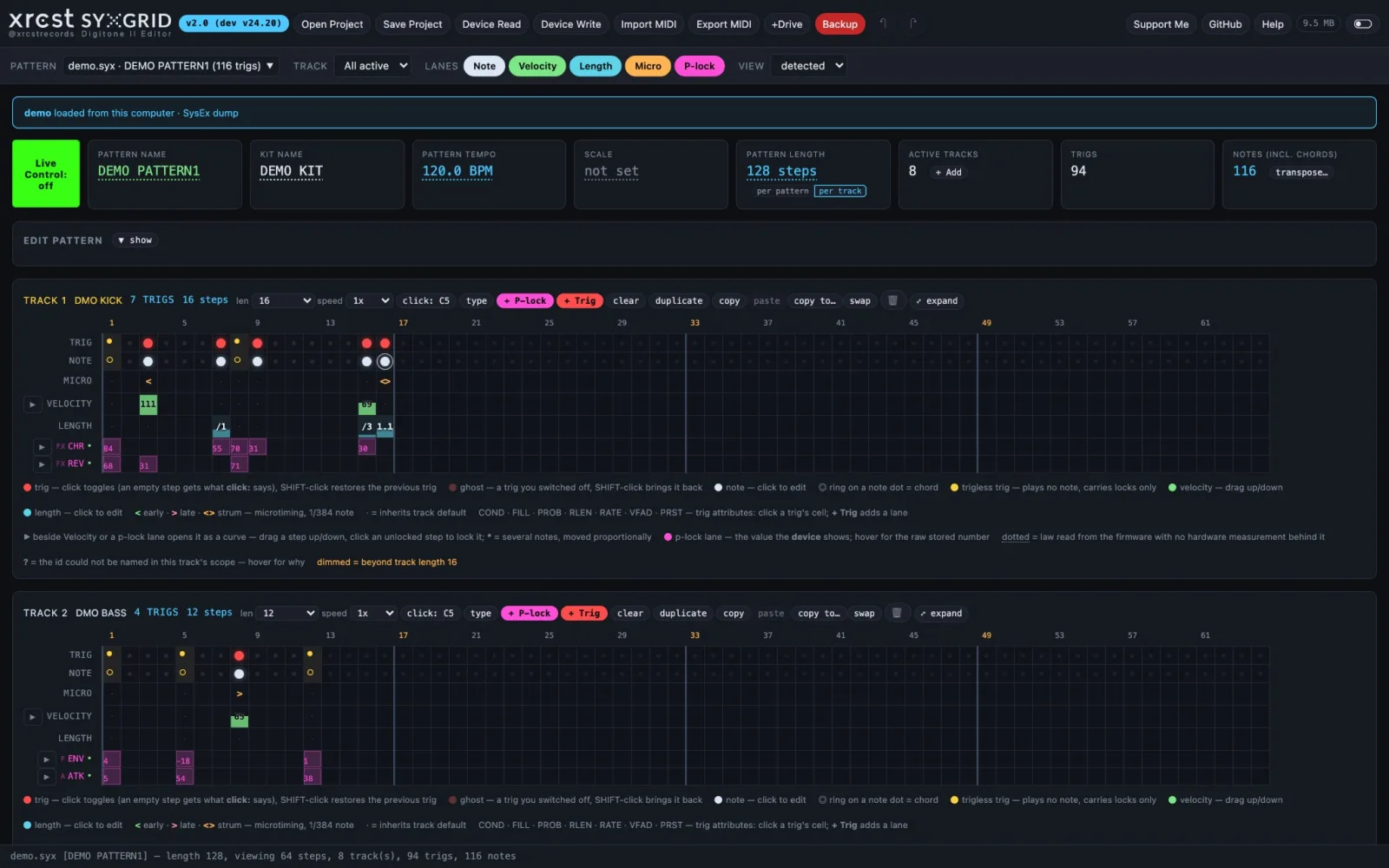
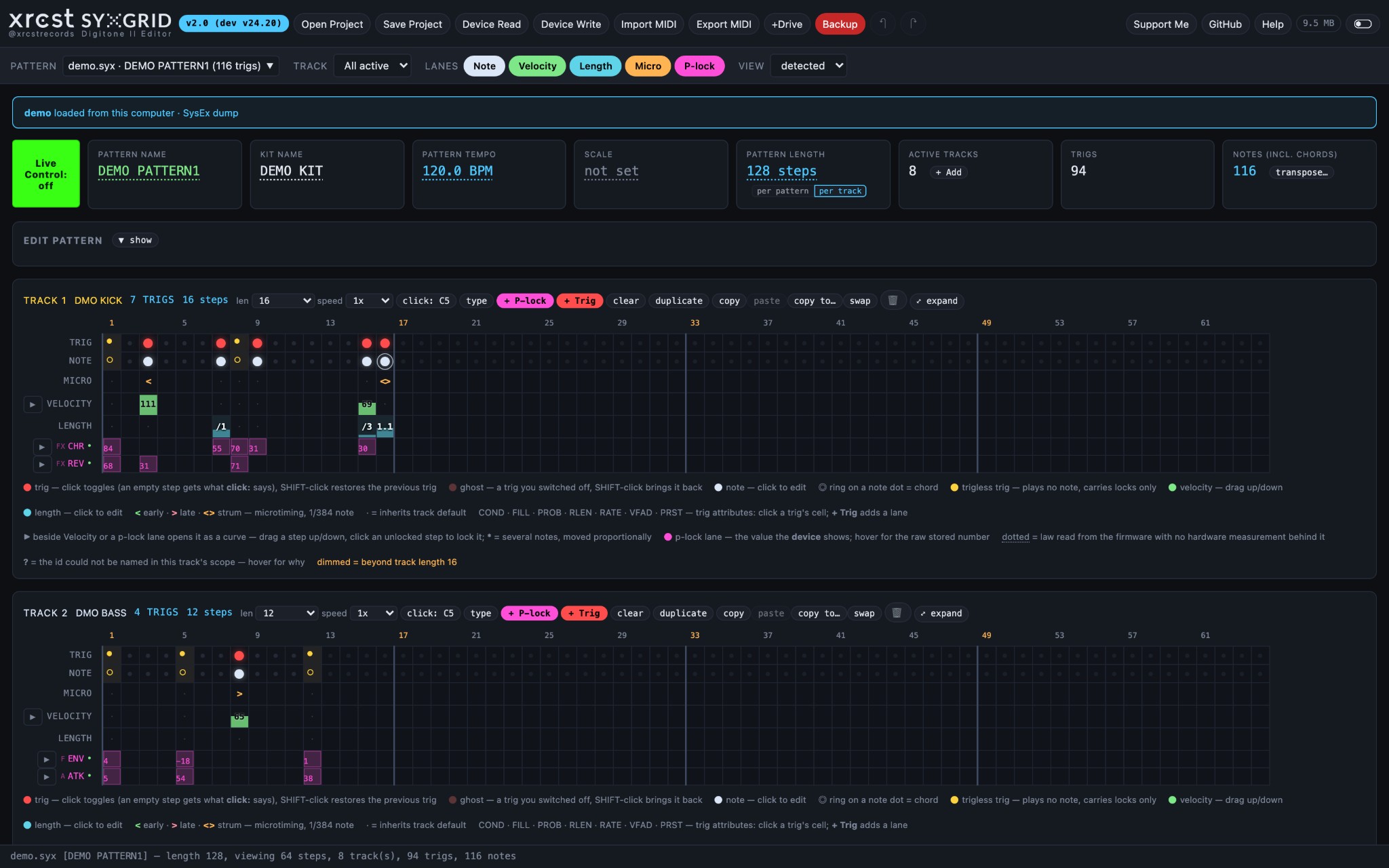
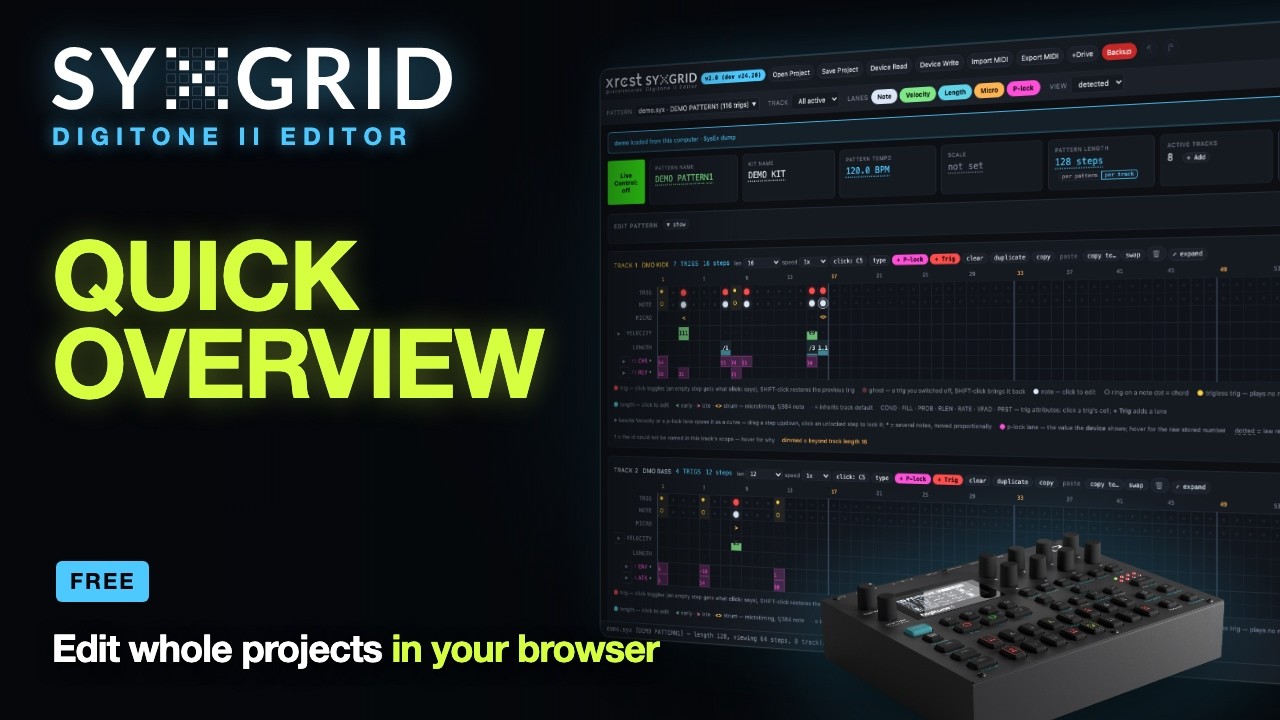
SYXGRID Digitone II
A browser editor for whole Elektron Digitone II projects — the sequence, the
sounds and the kits.
Read a project straight off the device's +Drive, edit it on a big screen, and put
it back. A single HTML file: no install, no account, no server. Stock firmware.
https://syxgrid.xrcst.com
What it does
- Projects in and out — read any project from the +Drive in seconds, or open a
.dn2prj (Transfer) or .syx dump. Write a whole project back into a +Drive
slot, read back and verified; send single patterns into the slots you choose.
OS 1.10E, 1.11 and 1.12 projects; Digitone I projects open as their conversion.
- Backup and restore — every project on the +Drive into one
.zip, and back.
A +Drive manager renames, copies, moves and swaps projects, kits and presets,
saving anything that would be lost first.
- The sequencer — 16 tracks × up to 128 steps with lanes for notes, velocity,
length and microtiming; chords; per-track length and speed; trig conditions,
probability, fills, retrigs and preset locks; p-locks by the device's own
parameter names, editable, and drawable as curves.
- Notes and harmony — a click places a note, a chord-memory chord or a chord
in the pattern's scale, voice-led from the previous trig; keyboard setup and
chord memory are editable; transpose.
- Sounds — every preset page the device shows (TRIG, SYN, FILTER, AMP, FX, MOD,
SETUP, ARP) with knobs you drag; swap a track's preset from the pool, a kit or
the +Drive library; save presets to disk, the pool or the +Drive; turn a MIDI
clip into a preset's arp.
- Kits and the project — the Kit tab (rename, copy, swap, save, send), kit
setup (levels, layering, voices), FX and mixer, songs, project settings.
- MIDI — export
.mid or Ableton .alc per track or all 16 tracks in one
type-1 file, with p-locks as CC, trig conditions played out and retrigs as
notes; import a clip back onto a track, microtiming included.
- Live Control (optional, off by default) — knob moves both ways between the
app and the device, and the playing step lit on screen.
- Undo — 100 steps, across patterns. A light and a dark theme.
An unedited project saves back byte-identical: everything the editor does not
change is carried through untouched.
Requirements
|
|
| Browser |
Talking to the device needs Web MIDI: Chrome, Edge, Brave or Opera. Firefox asks for a site permission first; Safari has no Web MIDI. Opening and editing files works in any modern browser. |
| Context |
HTTPS or localhost for MIDI — the hosted app at https://syxgrid.xrcst.com is both. |
| Hardware |
A Digitone II over USB, on stock OS 1.10E, 1.11 or 1.12. Close Transfer and Overbridge while the app talks to the device. The app finds the port named Digitone by itself; with two Digitones, or a port named differently, pick it with the MIDI button in the toolbar. |
Opened straight from disk (file://), the browser disables MIDI; opening and
editing files still works. To run your own copy with MIDI, serve the file locally:
python3 -m http.server 8080
# then open http://localhost:8080/sysex-visualiser.html
Before you write to the device
Back up first. SYXGRID writes real data to real hardware. The Backup
button saves every project on the +Drive as one .zip, and Restore puts them
back. A pattern sent through SYSEX RECEIVE lands in the slot selected on the
device and overwrites it.
Reporting bugs
Bugs and ideas go to GitHub issues:
https://github.com/xrcstrecords/syxgrid-digitone-ii/issues. In the app, Help →
Report a bug… opens the form and copies your SYXGRID version, browser and what
is loaded, to paste in. What you did, what you expected, what happened, the
Digitone's OS version and — if you can — the project or dump that shows it make
a report easy to act on.
Privacy
The app runs entirely in your browser. It keeps a few settings there — the theme,
the performance baseline, the running-lights offset, the +Drive library list —
and sends nothing anywhere. Your projects never leave your computer and your
Digitone.
Usage
Quick start
Projects in and out
|
|
| Open Project |
a .dn2prj (all 128 patterns, kits, pool, songs and settings) or a .syx dump of a pattern or a whole project. Projects from OS 1.10E, 1.11 and 1.12 open (1.12 stores them as 1.11 does); a Digitone I project opens as its conversion. The line under the pattern selector says what is loaded, from where, in which format, and warns when it is an early-OS project. |
| Device Read |
three ways in. +Drive read: Quick index lists the names at once, Complete index adds each project's format (Digitone I in red); pick one and read it. SysEx RPC request: the app asks, and the device sends its live project or one pattern. Manual SysEx dump: arm the listener, then start SYSEX DUMP on the device; a project dump ends on its own, otherwise press Dump done. |
| Save Project |
to this computer as .syx or .dn2prj, either way round: a dump is rebuilt into a .dn2prj, a .dn2prj's patterns and kits are framed as .syx. Tick whether the edits go in. |
| Device Write |
A whole project goes to a +Drive slot, read back to verify. Send over SysEx sends a pattern or a queue into the slot you choose, into the pattern playing now (not stored), or through SYSEX RECEIVE, where it lands in the slot selected on the device. Raise the dialog's GAP (ms) if a large send loses trigs. Kits and presets go from the Kit tab and the preset editor. The first send of a session offers a backup of the live project first. |
| +Drive |
the +Drive Manager: rename, delete, copy, move and swap projects, kits and presets on the device. Anything that would be lost is saved to this computer first, and every action is checked by reading the +Drive again. Leave the project open on the device alone: it cannot say which one that is. |
| Backup |
Back up all projects reads every project on the +Drive into one .zip with a manifest; read-only, it takes the projects as last saved. Restore puts a backup's projects back into their slots; occupied slots are skipped unless you choose to replace them. |
| MIDI |
the toolbar's MIDI port: the one every read, write, +Drive operation and Live Control uses. Auto takes the first port named Digitone; click it to pick another (two Digitones, or a port named differently); hover it to see which. The dialogs with their own port lists start from it, and picking a port there changes it. Green: connected; red: not connected. |
| progress |
every read, index and write shows a bar above its log; it slides while a read's size is not known yet, and turns red if something fails. |
| the +Drive and Live Control |
Not while Live Control is on: +Drive work needs Live Control off, since its traffic shares the USB port and the +Drive's replies get lost. The app asks to switch it off first. Close Transfer and Overbridge too. |
Live Control
|
|
| Live Control |
the green block before the pattern name. Off by default and after every reload: the app then edits the loaded data only. The same project must be open here and on the device. |
| safe while playing |
Apply the device's knobs (CC/NRPN in), send my edits (CC/NRPN out — with the device not in LIVE RECORDING, or every CC becomes a p-lock), and the running lights, which only listen to the device's clock and transport. |
| running lights |
each track's playing step lights, from CLOCK SEND and TRANSPORT SEND; with PRG CH SEND the view follows the pattern the device plays. Align now as the device's step 1 lights, or nudge the offset; it re-checks every bar against the clock. |
| follow the device |
asks for the pattern on screen every few seconds and merges what changed, never over your edits. It can make the device drop notes: each request costs a note while it plays. So it asks only while the device is stopped, and once on STOP — which it knows only from CLOCK SEND or TRANSPORT SEND. Off by default. |
| mod sources |
six knobs under the preset editor: velocity, pitch bend, mod wheel, breath, aftertouch, key tracking. On an audio track they send as you move them (Live Control on, sending); ▶ play plays an audition note. A source the preset does not route is dimmed. On a MIDI track they are read-only and follow what the device sends on its channel. |
Toolbar
|
|
| ↶ Undo ↷ Redo |
see Undo below. |
| Import MIDI / Export MIDI |
see Import and export below. |
| Demo |
a real demo pattern, editable, saveable and sendable, marked DEMO with a reload link. Offered when the page is served from the web. |
| MB badge |
performance: memory, page size and redraw times, with a baseline to compare against. |
| theme switch |
the light theme on or off, remembered in this browser. |
| Support Me · GitHub |
the support page, and the source code. |
| PATTERN / TRACK |
pick the pattern to edit and which track to show. All active draws every track that has trigs. |
| LANES |
show or hide the Note, Velocity, Length and Micro lanes; drawing only. |
| VIEW |
how many steps to draw. detected gives each track exactly its own length. |
The grid
|
|
| Click a trig dot |
toggle the trig. An empty step gets what the track's click: C5 button says — see Tracks. |
| Shift-click a trig dot |
restore the trig that was there before it was switched off — chord, velocity, microtiming and all. |
| Click a note dot |
the note editor: each note's name or number, velocity and length. Add adds a note, a chord-memory chord or a chord in the pattern's scale; Replace puts it in place of the step's notes. |
| Drag a velocity cell |
up or down (2 px = 1 unit), every note on the step. |
| Drag a micro cell |
nudge the step earlier or later, ±23 units of 1/384 note. |
| Click a length cell |
opens the note editor; length is per note. |
| ▶ beside a lane |
open the lane's curve to draw values across the steps. |
| ⤢ expand |
enlarge one track 4x (Expand). Sequences over 64 steps wrap into rows of 64; Esc shrinks. |
Reading the grid
|
|
| trig |
an ordinary note trig. A trig with parameter locks that still plays its note looks exactly like this — see below. |
| trigless trig |
plays no note, only carries parameter locks — the device's yellow trig. Shown and preserved exactly on save; its locks show in the lanes. A new one cannot be made here. |
| ghost |
a trig you switched off, remembered: Shift-click brings it back. |
| empty |
no trig on this step. |
| ring |
more than one note on the step — a chord. |
| note |
a single note on the step. |
| · dot |
the value inherits the track default. |
| dimmed cells |
past the track's length — they will not play. |
| lit step |
with Live Control's running lights, the step the device is playing. |
| Inherit defaults |
Note C5 (60), Velocity 100, Length 1/16 step. A blank field in the note editor uses these. |
Track machines
|
|
| FM TONE |
four-operator FM — the device default |
| FM DRUM |
percussion-oriented FM machine |
| WAVETONE |
two-oscillator phase-distortion / wavetable engine |
| SWARMER |
unison swarm machine |
| MIDI |
controls external gear instead of making sound |
| PRESET / MIDI CH |
the preset name on a synth track, the channel on a MIDI track. CH OFF: no channel set, so the track sends nothing — not channel 1. EMPTY: no track in the slot. |
| changing the machine |
a synth track's machine comes with its preset: pick another preset (the track name) and the machine changes with it. A track can be switched between audio and MIDI from its number. |
Tracks
|
|
| + Add track |
create empty tracks; all and none select in bulk. MIDI tracks get a channel picker, with OFF as a choice. |
| clear |
remove every trig but keep the track, its length, speed and type. |
| duplicate |
copy a track's trigs to another track; the picker marks a track that has trigs as n trigs — will be REPLACED. |
| copy / paste |
a track's preset, or its trigs — notes, conditions, probability, retrig, preset locks, length and speed — onto any track of any pattern. Pasting trigs asks about their p-locks: kept when the machines match, left out when they differ. |
| copy to… |
a track's sequence onto any track of any loaded pattern, ticking what goes: trigs, notes, p-locks, probability, the preset. |
| swap |
swap the complete track with another, preset included; the p-locks follow the sound. |
| 🗑 |
delete the track. Switching off the last trig does not delete it. |
| len / speed |
per-track length and speed; a per-track length switches the pattern to per-track mode. |
| click: C5 |
what clicking an empty step places — a note, a chord from the pattern's chord memory, or a chord in its scale by degree and kind (triad, 7th, sus2…), with velocity and length; voice-lead picks the inversion that moves least from the previous trig. |
| trig attributes · + Trig |
the COND, FILL, PROB, retrig (RLEN, RATE, VFAD) and PRST lanes. Click a trig's cell to set it, or Not set for the track default; + Trig adds a lane. No retrig on a MIDI track. |
| parameter locks |
the lanes under the grid show every lock by the device's name and value. Click a cell to set or change the lock on that step. |
| names: T1…T16 |
the track's type (audio or MIDI) and name. |
| names: PTN / GLB |
the mutes, coloured as on the device: M pattern mute (saved with the pattern) and M global mute (saved with the project). Lit = plays; struck through = muted. Click to toggle. |
| names: the name |
on an audio track, a preset picker: the project's pool, its kits, or the device's +Drive library (banks A–H, read when you ask). On a MIDI track, its channel. |
The preset editor
|
|
| machine cell |
click a track's machine to open its preset beside the track names: every page the device shows (TRIG, SYN, FILTER, AMP, FX, MOD, SETUP, ARP), with the values it shows. Drag a parameter (Shift for fine steps) or click it to type; the change is saved with the pattern, and Undo takes it back. |
| Save preset… |
keep the sound on its own: to disk (.dn2pst for Transfer, or .syx), a pool slot, another pattern's kit, or an empty slot of the +Drive library (read before and after to confirm). Empty slots show green. |
| arpeggiator |
the Arp page; From a MIDI file… turns a clip into the preset's arp: notes snapped to its SPEED, offsets from the root, up to 16 steps, one Undo. |
| mod sources |
the six knobs under the editor — see Live Control. |
Pattern and project
|
|
| PATTERN NAME |
click to rename, 16 characters. |
| KIT NAME · Kit tab |
the kit name opens the Kit tab: rename the kit; copy another pattern’s kit in, load or save it on the +Drive, send it, save it as .syx, save all its presets; and each track’s preset — edit, replace (pool, a kit, the +Drive), swap two tracks’ presets, save — with its level. |
| TEMPO |
click to set the BPM, stored as BPM×120, so 174.5 is exact. With the project's TEMPO set to PROJECT the device plays every pattern at the project's tempo; the card says so. |
| SCALE |
the pattern's scale, or not set; click for the Keyboard setup tab. |
| PATTERN LENGTH |
1–128 steps; per pattern or per track. Growing offers empty steps or copies the existing trigs, as the device does; shrinking keeps the trigs past the end, silent. |
| transpose… |
move the notes of the ticked tracks; a move past 0–127 is refused whole. |
| chord memory |
the sixteen chords a pattern stores, on the Chords tab, named as the CHORD MEMORY screen names them (D4 A4 F5), with the chord's name and its degree in the scale. Edit chords… writes them. |
| Keyboard setup tab |
MODE, ROOT and SCALE, per pattern or per track, each track's octave, chord SHAPE/TYPE, BASS and CENTER. |
| Kit setup · FX & mixer tabs |
track levels, CONTROL ALL, compressor routing, pattern transpose, track layering and chokes, voice steal and each track's voices; the chorus, delay, reverb, compressor and inputs. |
| Pool · Song · Stats · Project tabs |
the preset pool; every song's rows; the pattern's counts and per-track settings (Euclidean among them); the project settings. |
| early-OS projects |
a project saved by an early OS (format 2) keeps kit setup, Euclidean and the track keyboard elsewhere; those editors refuse it and say how to convert it (load it on OS 1.11, save once). |
Import and export
|
|
| Export MIDI |
pick .mid or .alc and which tracks. Files are named slot–pattern–track. All tracks in one file writes a type-1 .mid with each track on its own channel and the shorter tracks repeated to the longest. |
| Import MIDI |
a .mid or .alc onto a chosen track; speed and length auto-detected. replace clears the track first, merge keeps what is there. |
| microtiming |
survives both ways: an off-grid note comes back as a trig plus its offset. |
| speed multiplier |
applied to both formats: a 2x track's steps last half as long. |
| overlapping notes |
a trig can outlast the gap to the next on the same pitch, which MIDI cannot hold; notes are trimmed to stop just before the next one. |
| notes before the start |
a negative offset on step 1 is pulled to zero, and the count reported. |
| Simulate conditions |
off by default, when every trig is written once. On, the pattern plays until every condition has come round (at most 64 passes) and each pass keeps only the trigs that would play. FILL trigs are left out; a trig with a probability counts as played. |
| Keep retrigs (best effort) |
a retrigged step becomes its burst of notes, at its rate and fade, up to the next trig. Unticked, an export writes a single note for that step. |
| Keep probability |
.alc only: each note keeps its trig's chance, as Live 11 and later store it. |
Undo
|
|
| Cmd-Z / Ctrl-Z, ↶ Undo |
revert the last edit, then the one before — up to 100 steps, across patterns: undoing a change to another pattern switches to it. |
| Shift-Cmd-Z / Ctrl-Y, ↷ Redo |
re-apply what was undone; a new edit ends the trail. |
| what it covers |
every edit: trigs, notes, lanes, track operations, lengths, tempo, names, kits, keyboard and kit setup, p-locks and preset parameters. |
| what it does not |
opening, reading from the device and importing are not undoable: they replace the project rather than edit it. |
Shown but not editable
|
|
| trigless trigs |
shown and preserved, their locks in the lanes; a new one cannot be made here. |
| retrig set as a lock |
the grid does not draw the repeats; an export writes a single note for that step unless Keep retrigs is ticked. |
| songs |
every song's rows, on the Song tab. |
Before you write to the device
Reporting a bug
|
|
| Report a bug… |
below this help: opens the bug form on GitHub (github.com/xrcstrecords/syxgrid-digitone-ii/issues) and copies your SYXGRID version, browser and what is loaded, to paste in. A free GitHub account is needed to post. |
| what helps |
what you did, what you expected and what happened; the pattern and track; the Digitone's OS version; and, if you can, the project (.dn2prj) or dump (.syx) that shows it. |
| ideas |
welcome on GitHub too — open an issue and say what you would like. |
Keyboard
|
|
| Cmd-Z / Ctrl-Z |
undo; again to go further back |
| Shift-Cmd-Z / Ctrl-Y |
redo |
| Esc |
close a dialog; if none is open, shrink an expanded track |
| ? or H |
open this help |
| Shift + length list |
in the note editor, only the common note divisions |
Format documentation
sysexmap/ documents the pattern SysEx format itself — 45 mappings
(map version 1.13.0), each with an explicit confidence level and the
evidence behind it.
| Level |
Meaning |
Count |
| 🟢 A |
Hardware-confirmed against a physical DN2 |
23 |
| 🔵 B |
Corpus-confirmed by the fixtures in this repository |
12 |
| 🟡 C |
Inherited — verified elsewhere, only one value exercised here |
9 |
| 🔴 D |
Unknown — do not rely on it |
1 |
This is reverse-engineered, not vendor documentation. Entries below level A
may be wrong. SYSEXMAP.md is generated from mappings.json, and a test fails
the build if the map and the app's constants disagree — a mapping document that
drifts from the code is worse than none, because it keeps looking authoritative
after it stops being true.
Credits and prior work
SYXGRID's decoding was derived independently from hardware captures, but it did
not happen in a vacuum. Everything below either contributed code or shaped the
work, and it is listed here because a format map that hides where it came from
is worth less than one that shows its sources.
Code
- elk-herd — Mark Lentczner.
BSD-2-Clause, Copyright (c) 2017 – 2025 Mark Lentczner. Its Elektron 7-bit
SysEx codec and
F0 00 20 3C framing were ported to Python for this
project's research tooling — device-agnostic parts only, since elk-herd does
not support the Digitone family. No elk-herd-derived code is in the editor
itself; the port lives in the development repository's research tree.
Inspiration and reference — friendly projects that informed the work.
No code from any of them is in SYXGRID: what was learned from them was
re-measured on hardware and written here from scratch. Two of them run as
unmodified external tools in the development repository's offline checks,
never as part of the editor.
- digi-roll — zooloo303. Its
DN2 pattern-format documentation
is the most thorough public description of this format anywhere, and it
reaches past where this project had got: the p-lock pool with a measured
paramId table, trig conditions, swing, and the fact that velocity, length and
micro-timing are stored per note rather than per trig. Found late, after
most of the reverse engineering here was already done — but it helped
enormously, and several things listed below as limitations are fixable
because of it.
- digitone-syx-toolkit —
emnyeca. Used as a cross-reference while checking step-word encodings.
- dn-deobfuscator — zerubeus (the repository is no longer online).
Consulted during the
.dn2prj project-file research.
- libanalogrytm — bsp2. Reference
for Elektron container structure and checksums.
- elektroid — David García Goñi.
Reference for Elektron device transfer over USB.
- DNX — Noise and Matter.
AGPL-3.0. Its published hardware measurements — the Digitone I → II sound
map, song and storage formats, +Drive transfer — are cited throughout this
project's maps; its code is not used.
- dn2_firmware_explore —
angellinares. AGPL-3.0. Its readings of the Digitone II OS image placed the
512 bytes OS 1.11 adds before the songs (fixed in v23.58), and its project-load
script is run, unmodified, as an external tool in the offline firmware load
check.
- digikit — m-dwyer. GPL-2.0. The
ColdFire emulator that check runs the Digitone II's own loader in; used as an
external tool, no code taken.
- The Elektronauts Digitone 2 pattern manager thread
— community groundwork on Web MIDI and dump sizes.
Where this project and another disagree, the disagreement is noted in
sysexmap/ with the evidence, rather than quietly resolved in one direction.
Licence
|
|
| The application |
AGPLv3 — see LICENSE (MIT through v22.37); a commercial licence is available on request |
sysexmap/ documentation |
CC BY 4.0 — see sysexmap/LICENSE |
Copyright (C) 2026 XRCST — https://syxgrid.xrcst.com
The split is deliberate. Creative Commons
recommends against using CC licences for software
— they carry no patent grant, no source/binary distinction and no warranty
disclaimer — so the program uses a proper software licence and the format map
stays CC BY, the right fit for a documentation work. Both require attribution.
The application relicensed from MIT to AGPLv3 as of v22.46 (see
CHANGELOG.md): any modified version run as a network
service — including a fork deployed as a hosted, closed-source product —
must offer its users the modified source, not just a copy handed out on
request. Every tagged release through v22.37 remains available under MIT;
that permission is not retroactively withdrawn, only not extended forward.
Building SYXGRID into a product? The AGPL requires the whole product's
source to be published under the same terms. If that does not suit, a
commercial licence is available from the author: https://syxgrid.xrcst.com.
AGPLv3 §13 applies to this app as deployed at https://syxgrid.xrcst.com: the
GitHub button in the toolbar is the required Source link for anyone
interacting with the live site.
The editor travels as a single loose HTML file, so the copyright notice lives
inside the file as well as here — email it to someone and the attribution
goes with it.
Versions
Public releases are numbered v0.1, v0.2, … Development happens on a
separate, faster-moving track and the in-app version string carries both, e.g.
v0.1 (dev v24.21), so any copy of the file can be traced back to the
exact source it was cut from.
See CHANGELOG.md. The last v1 release stays online at
https://syxgrid.xrcst.com/syxgridv1.html.
Disclaimer
This project is not affiliated with, endorsed by, or supported by Elektron.
Elektron and Digitone are trademarks of Elektron Music Machines MAV AB.
It reads and writes files for hardware it was reverse-engineered against.
It ships with no warranty — keep backups of patterns you care about.