
Analog Rytm Project/Pattern/Kit Manager
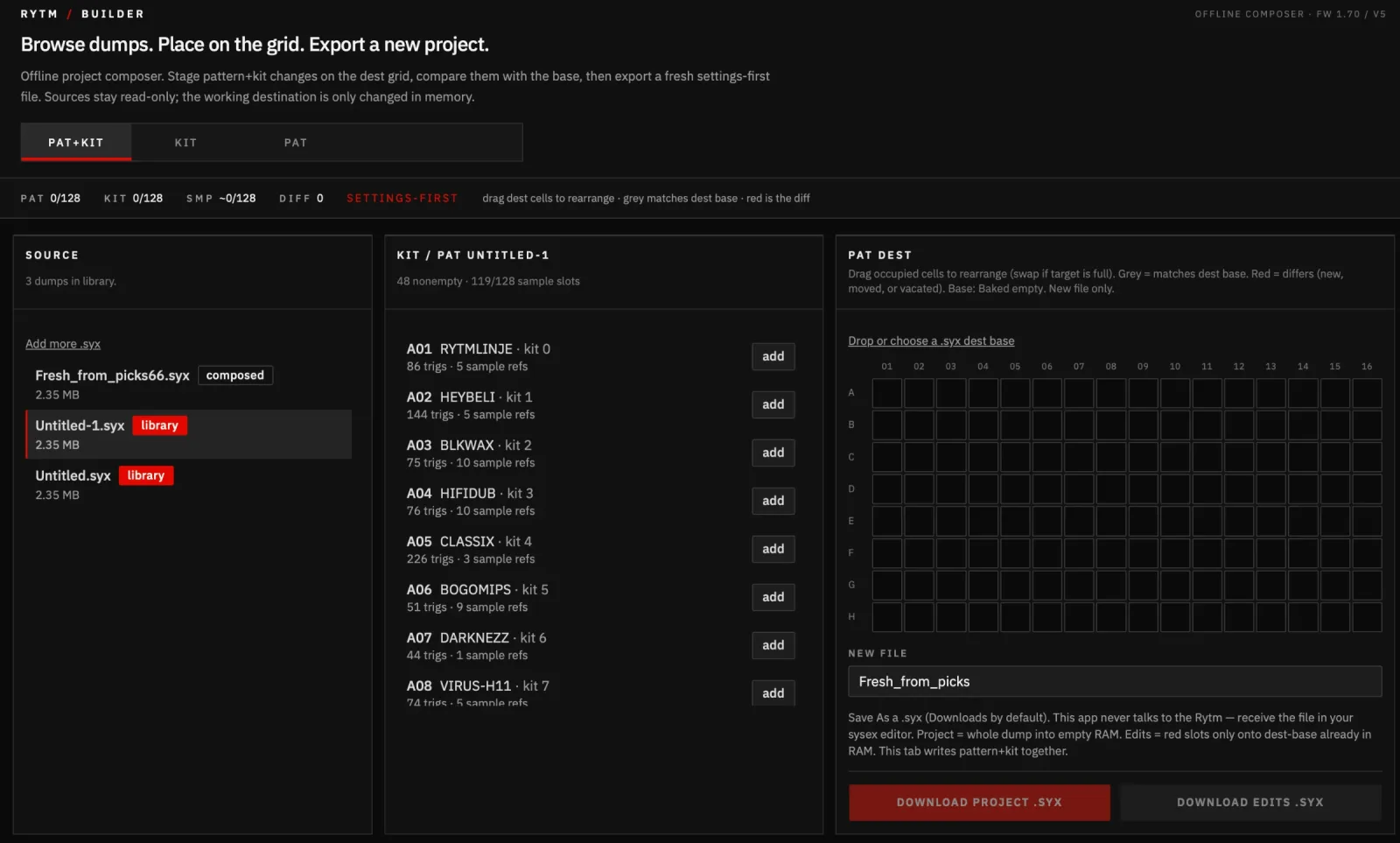
Mac app to compose Analog Rytm patterns and kits from sysex dumps into a new project .syx
About
septillionj.gumroad.com/l/bzzaqg
README
rytm-builder
Compose and stage Analog Rytm pattern and kit changes from a library of dumps, then export a fresh whole-project or differential .syx. Source files stay read-only; the working destination is changed only in memory, and every run writes a new file.
Samples must already live on the Rytm +Drive. The builder only copies 16-byte fingerprints so restored kits bind to those files. There is no USB/MIDI send.
Firmware target: AR 1.70 / v5 object sizes (same as Johnny’s MK1 dumps).
Mac app (double-click)
This branch (cursor/rytm-mac-app-0afb) is the working universal Mac wrap (Intel + Apple Silicon).
git clone -b cursor/rytm-mac-app-0afb https://github.com/stampman3000-jpg/rytm-builder.git
cd rytm-builder
Already-built .app: double-click to open. The first time, right-click the app → Open and confirm. It is unsigned, so a normal double-click can be blocked by Gatekeeper.
Build from this repo (Node + Rust). Compose runs in-process; the window is a webview, not a hidden Next server.
cd web && npm install && cd ..
npm --prefix web run desktop:build
That writes a universal .app (Apple Silicon + Intel) and a .dmg:
target/universal-apple-darwin/release/bundle/macos/rytm-builder.apptarget/universal-apple-darwin/release/bundle/dmg/
macOS 10.15 Catalina is the claimed floor on Intel. Apple Silicon already needs Big Sur. Mojave and older are not a goal. A copy is usually placed on the Desktop after a local build. Library dumps stay in ~/Library/Application Support/rytm-builder/library. Download project / Download edits open Save As (Downloads by default) and also keep a copy under Application Support/rytm-builder/exports.
Dev window (same engine, not a website):
cd web && npm install && cd ..
npm --prefix web run desktop
CLI
Needs Rust 1.83 (or similar; not edition 2024). From this directory:
cargo build
The binary is target/debug/rytm-builder.
Keep personal .syx dumps out of git (they are gitignored). Point the CLI at a local dumps folder.
Tabs
Drop dumps into the app library, place pattern+kit pairs on an A–H × 1–16 dest grid (empty cells stay empty), switch to KIT for dest kit slots 00–127, or PAT to overwrite dest pattern slots while keeping dest kit numbers. Drag dest cells/rows to rearrange (vacate or swap). Grey matches dest base; red is the differential. Download project writes a whole-project .syx (empty/disposable RAM). Download edits writes settings + changed kits/patterns only (dest-base already in RAM). Kit-tab edits omit pattern objects; pattern-tab edits omit unchanged kits. This tool never talks USB. Restore model: receive the file in a sysex editor.
Catalog a dump
cargo run -- catalog /path/to/Untitled.syx
Prints nonempty patterns (A01–H16), linked kit name/index, trig counts, and kits that have names or sample slots.
Compose a fresh project
Use an empty whole-project dump as --template (a newly created Rytm project, saved and dumped — not a file this tool “clears”). Copy one or more PATH:PATTERN or PATH:PATTERN:DEST pairs. With no dest, slots fill from the first empty pattern (legacy). With dest (e.g. C04), that cell is written and others stay empty. --vacate A03 empties a dest pattern (needed when rearranging dest-base cells). --copy-kit PATH:KIT:DEST overwrites dest kit DEST (A01–H16 = kit 0–127) and remaps sample fingerprints; patterns are not written. Occupied dest kits are overwritten so patterns already using that kit pick up the new analog. --vacate-kit empties a dest kit object.
cargo run -- compose \
  --template /path/to/Untitled-4.syx \
  --out /path/to/Fresh.syx \
  --copy /path/to/Untitled-1.syx:A03:C04 \
  --copy /path/to/Untitled.syx:A01:C05 \
  --report /path/to/Fresh.txt
Kit-only (no pattern write):
cargo run -- compose \
  --template /path/to/Untitled.syx \
  --edits-out /path/to/KitSwap__edits.syx \
  --copy-kit /path/to/Untitled-1.syx:A03:A01
Pattern-only (keeps dest kit number):
cargo run -- compose \
  --template /path/to/Untitled.syx \
  --edits-out /path/to/PatSwap__edits.syx \
  --copy-pattern /path/to/Untitled-1.syx:A03:A01
Rules the tool will not bend:
- Never overwrites
--outor--reportif the path already exists. - Remaps pattern
kit_number, kitsample_nr, and SMP_NR parameter locks. - Reuses a destination sample slot when the 16-byte fingerprint already exists; otherwise allocates the next empty slot (1–127).
- Writes settings, then globals, then kits/sounds/patterns/songs. Kits-first is how samples show as OFF on the box.
- After writing, checks that template and source dumps are still byte-identical.
Restore on the Rytm
This app never talks to the device. Receive the downloaded .syx in Transfer / C6 / similar.
Whole project (--out / Download project):
- Samples for those fingerprints must already be on +Drive.
- Open an empty or disposable project in RAM (do not send onto a project you care about).
- Receive the
.syxas a whole project. - Check pattern slots, kit names, analog sound, and that samples are bound (not SMPL OFF).
- Save the project on the device if it sounds right.
Edits (--edits-out / Download edits):
- The project already in RAM must be the dest-base dump (grey cells).
- Receive the smaller
.syx(settings, then kits, then patterns). Vacated slots come through as empty patterns. - Same sample / analog checks on the red cells only. Grey neighbours should be untouched.
What this version does not do
No live USB, no firmware SysEx, no Transfer .arpj, no sample upload, no song editing, no in-place project surgery, no sample names, no Windows .exe yet.
Proven fixture (Play 1)
From empty template Untitled-4.syx:
| Source | Pattern | Kit | Lands in dest |
|---|---|---|---|
| Untitled-1 | A03 | 2 BLKWAX |
A01 kit 0 |
| Untitled | A01 | 0 MD1 |
A02 kit 1 |
Output example: Fresh__from_Untitled4_BLKWAX_MD1.syx (settings-first, 405 messages, 17 allocated sample slots). Restore that file on the box before composing bigger packs.
Pictures in the README load from GitHub.
- Language
- Rust
- Stars
- 0
- Forks
- 0
- Created
- Today
- Last commit
- 6 hours ago
Added by championsoundz on Today · History (1 version)