

Today, 02:00 AM#1
README
digitables
M8-style pitch tables for the Digitone (mk1): a table is up to 16 steps of semitone offsets with a length and a loop point, and the project holds 16 of them. A sound with a table on plays every note through it: each note restarts the table and the sequencer's clock steps it, so one trig plays an arpeggio, a trill, a pitch drop or a riff, from a slow walk to a buzz at 1500 steps a second.
It is an elekloader mod for Digitone OS 1.43. elekloader builds a custom OS file on your own machine, from your stock OS file and the mods you pick; nothing from Elektron is distributed.
Status. The TBL page, the editor, playback and the fast speeds have run on a Digitone (digitables 1.1). The Mod Menu (1.2, with core-dn1 2.2) has been checked in the emulator. The Digitone Keys runs the same OS file but has not been tried.
What it does
The TBL page
Hold a track key (T1-T4) on its own for about half a second: the Mod Menu opens (it is core-dn1's, and lists every mod that put an entry there). Pick TABLES with YES (or trig key 1). The TBL page is also AMP's third page: press AMP until it shows.
| knob | |
|---|---|
| A: TBL | the sound's table: OFF, or 1-16 |
| B: SPD | the table's speed: ticks of the 24 PPQN clock a step, 1-24 (6 is a 16th, 24 a quarter note), and faster to the left of 1: a step every 1/2, 1/3, 1/4, 1/6, 1/8, 1/12, 1/16, 1/24 or 1/32 of a tick, and MAX, a step every audio block (1500 a second, at any tempo), as fast as the Digitone can change a pitch. At 120 BPM a tick is 1/48 s, so 1 is 48 steps a second and 1/16 is 768. |
Both are sound parameters: saved with the kit, shown and edited like the stock ones, and p-lockable per trig (hold a trig in grid recording and turn the knob), so one trig can play another table, or none, or at another speed. Turning SPD while a note plays changes its speed from the next step.
The table editor
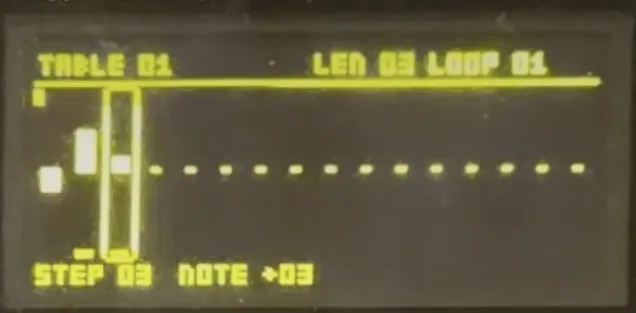
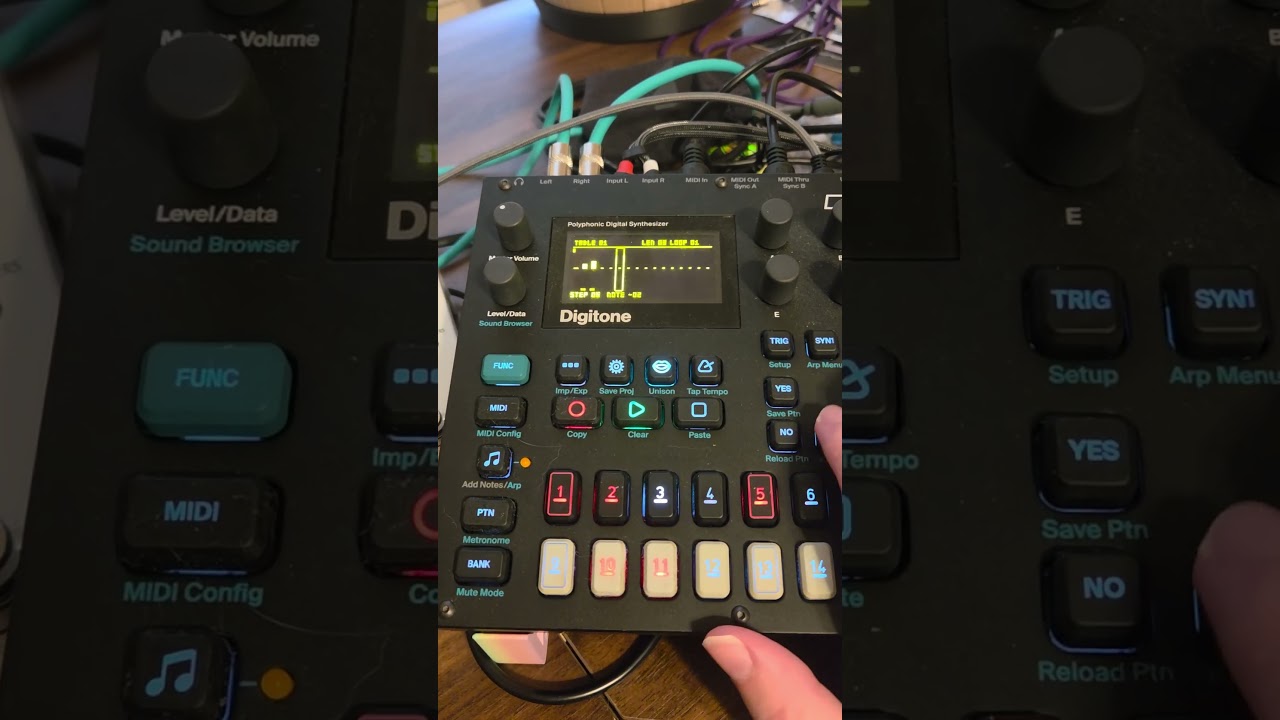
On the TBL page, hold a track key: the editor fills the screen with the table, its 16 steps as bars around a zero line.
| control | |
|---|---|
| trig keys 1-16, LEFT/RIGHT | pick a step |
| A, UP/DOWN | the step's offset, -48 to +48 semitones (FUNC+UP/DOWN: an octave) |
| B | the step |
| C | the table's length, 1-16 |
| D | the loop point: OFF (the last step holds), or 1 up to the length |
| H | which table, 1-16 |
| NO, or hold a track key | back to the TBL page |
| a page key (TRIG ... LFO) | leave to that page |
PLAY, STOP, FUNC and the track keys still work while it is open. The table opens on the one the track's sound plays; a marker under a step follows a note playing that table. Edits sound at once, even on a note already playing.
How a table plays
A note starts at step 1, its own pitch plus step 1's offset, and moves on one step at the SPD speed: 1, 2, ... up to the length, then from the loop point to the length over and over, or the last step held when the loop is OFF. The clock runs at the tempo whether the sequencer plays or not, so a note played live from the trig keys (KEYBOARD) steps the same way. Table 1 starts as an arpeggio (0, +12, +7, +3); the others start empty (all 0, length 16).
A quick one to try: a C64 chord. In table 2, steps 0, +4, +7, length 3, loop 1; TBL 2 and SPD 1 on a bright sound with a short release, and hold a long note. Minor: 0, +3, +7. At 1/16 to MAX small offsets (0, +1, or 0, +12) turn into vibrato and FM-like buzz.
Saving
The tables are part of the project: SAVE PROJECT and SAVE PROJECT AS save them, LOAD PROJECT loads them, and a new project starts with the defaults. They live in 480 bytes of the project's file that the Digitone OS leaves alone, so a project saved with digitables loads on the stock OS (which ignores them) and keeps them through a save there.
Install
You need:
- elekloader:
- Windows: download
elekloader-<version>-windows.zipfrom elekloader's releases, unzip it and runelekloader.exe. - Other systems: run elekloader from source with Python 3.9 or newer (see its README).
- Windows: download
- This mod and its core:
digitables-1.2.elemodandcore-dn1-2.2.elemod, from this repository's releases. digitables needs core-dn1 2.2 (its parameter slots, mod pages, project data and Mod Menu), which elekloader's releases do not have yet: the apps bundle core-dn1 2.0a. Install the 2.2 core from here until they do. - The stock OS file:
Digitone_and_Digitone_Keys_OS1.43.syx, from Elektron's Digitone downloads. The mod is for OS 1.43 only; elekloader recognises the file by its hash.
Then build your OS in elekloader's window:
- Change stock firmware... (top right): choose
Digitone_and_Digitone_Keys_OS1.43.syx. - + Install from file...: choose
core-dn1-2.2.elemod, thendigitables-1.2.elemod. - Tick digitables. Make sure the core ticked with it is core 2.2 (untick core 2.0a if it is ticked). The check below the list should say "No conflicts ... Ready to build". It links with digihealth 1.1 too (checked by elekloader's lint; not yet run together).
- OS version shown: the 4 characters the unit will show, for example
TB12. - BUILD FIRMWARE, and save the
.syx. elekloader verifies it before writing it.
Flash it with Elektron Transfer, as for any OS update: connect the unit
over USB, select it in Transfer and Connect, drag the .syx onto
Drop files here, and press YES on the unit. Don't turn it off until
the upgrade is done.
Or on the command line (elekloader from source):
python -m elekloader.patch --stock Digitone_and_Digitone_Keys_OS1.43.syx \
    --mod core-dn1-2.2.elemod --mod digitables-1.2.elemod \
    --out Digitone_OS1.43-digitables.syx --version TB12
Recovery: elekloader never changes the bootloader, so the stock OS
file always restores the unit. Hold FUNC while powering on for the
startup menu, and press TRIG 4 for OS UPGRADE. Then send the stock
.syx with Transfer.
Build it from source
With elekloader's SDK and the m68k cross compiler (elekloader's README says how to get them):
python -m elekloader.sdk.build path/to/digitables --stock Digitone_and_Digitone_Keys_OS1.43.syx
python -m elekloader.lint path/to/digitables/out/digitables-1.2.elemod \
    --stock Digitone_and_Digitone_Keys_OS1.43.syx --with core-dn1-2.2.elemod
core-dn1 2.2 is elekloader's mods/core-dn1 (pull requests
#34 and
#35).
What it uses
- core-dn1's events:
ev_voice_on(a note starts: the table restarts),ev_render_out(every audio block: the steps, written to the voices' pitch words),ev_key,ev_enc,ev_tickandev_draw(the editor), andev_hold(a hold on the TBL page opens the editor); - two parameter slots, ids 182 and 183, on sound slots 26 and 65, which no stock parameter uses;
- mod page 27, after AMP's second page;
- project data
TBL1(320 bytes); - a Mod Menu entry, TABLES.
Known limits
- Power-up: the Digitone keeps a working copy of the project for power-up, which the tables go into like the rest; the emulator cannot show that step, so it is unchecked until a unit runs it.
- The arpeggiator and portamento have not been tried with tables.
- OS 1.43 only (core-dn1 2.2 has OS 1.44 too; digitables does not yet).
Licence
GPL-2.0-or-later, as elekloader. See LICENSE.
Pictures in the README load from GitHub.
What's New
digitables 1.2
M8-style pitch tables for the Digitone mk1 (OS 1.43): 16 tables of up to 16 semitone steps, each with a length and a loop point, saved with the project. Each note restarts its sound's table and the clock steps it.
- The TBL page: hold a track key (T1-T4) on its own to open core-dn1's Mod Menu, and pick TABLES; or press AMP until its third page. TBL sets the table (OFF, 1-16) and SPD the speed, from 24 ticks of the clock a step down to 1, then 1/2 ... 1/32 of a tick, then MAX, a step every audio block (1500 a second). Both are sound parameters with p-locks.
- The table editor: hold a track key on the TBL page. Trig keys pick a step; A sets its offset (-48..+48), C the length, D the loop point (or OFF: hold the last step), H the table.
- Saved with the project: SAVE PROJECT and LOAD PROJECT carry the tables, in a part of the project file the stock OS leaves alone, so the project still loads on stock firmware.
Status: the TBL page, the editor, playback and the fast speeds have run on a Digitone (1.1). The Mod Menu (1.2) has been checked in the emulator, along with the release build itself (menu, page, editor, playback). Not yet checked: restoring the tables at power-up, and the arpeggiator or portamento with tables.
Install
digitables 1.2 needs core-dn1 2.2, attached here (core-dn1-2.2.elemod, built from elekloader's mods/core-dn1 in #34 and #35). elekloader's apps bundle core-dn1 2.0a, so install the 2.2 core with the mod until a release has it.
In elekloader, choose Digitone_and_Digitone_Keys_OS1.43.syx as the stock firmware, + Install from file... both files, tick digitables, and make sure the core ticked with it is 2.2. The README has the steps, the command line, and how to get back to stock.
| file | sha256 |
|---|---|
digitables-1.2.elemod |
545c485ec616fbd8363d76d49802a2ea012a9c954e744636a18f1477c08dee43 |
core-dn1-2.2.elemod |
29e41968bc4789c0082b4387c1ccdde9bc36f1db5d87f5777a56f383328e5f21 |
Discussion
From the forum. Replies you write here are posted in the thread.Repositoryirpina/digitables
- Language
- C
- License
- GNU General Public License v2.0
- Stars
- 1
- Forks
- 0
- Created
- Today
- Last commit
- 21 hours ago
Added by Neutron on Today · Last edited by Neutron, 17 hours ago · History (2 versions)