digineighbor
A NEIGHBOR machine for the Digitakt (mk1), like the Octatrack's neighbor
machine: a track set to NEIGHBOR plays another track's audio instead of a
sample, through its own overdrive, filter, envelope, volume, pan and sends.
Any track can be the source. It adds a pitch shifter (TUNE) and an
amplifier (GAIN).
It is an elekloader mod for OS
1.53 and 1.54, a file for each. elekloader builds a custom OS file on your own machine, from your
stock OS file and the mods you pick; nothing from Elektron is distributed.
A prototype. The routing has run on a unit. TUNE, GAIN, LEV and the
trimmed page (0.4 and 0.5), and core 2.1's machine slots (0.6), have so
far only been checked in the emulator.
What it does
-
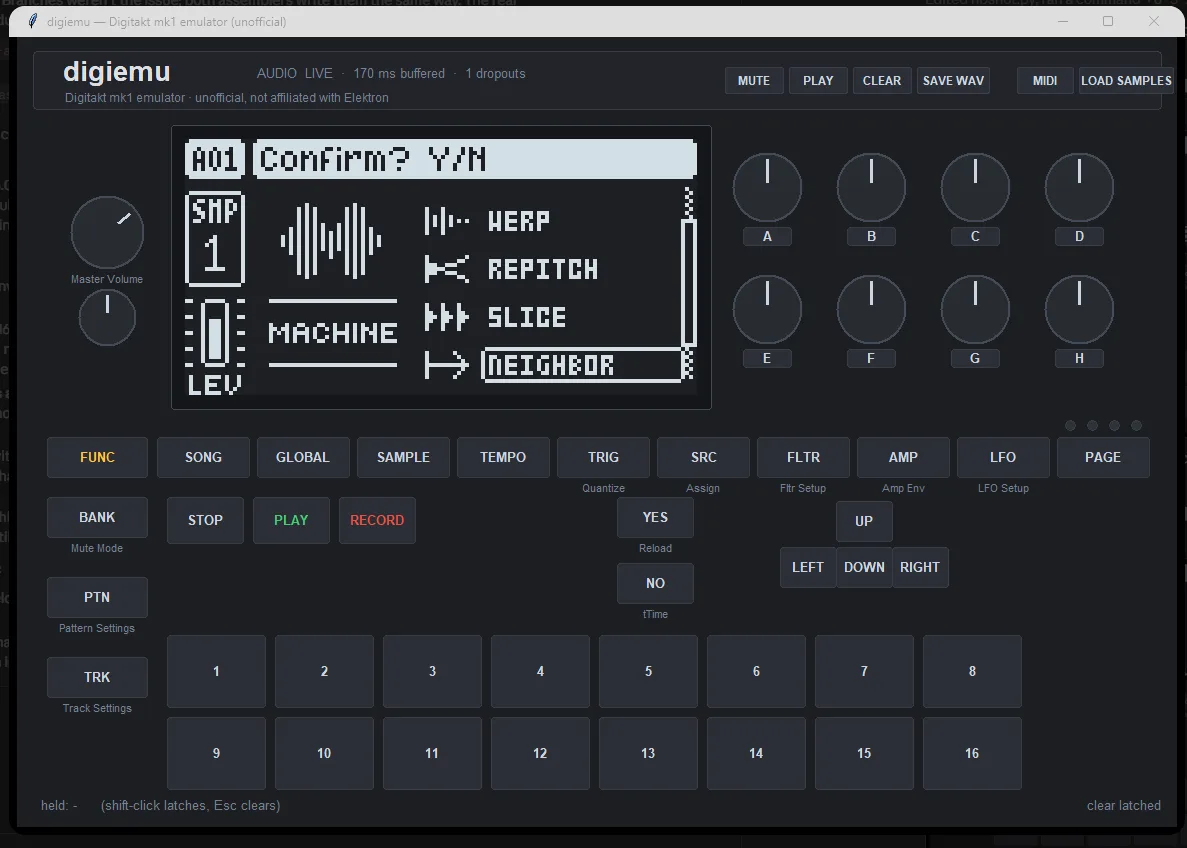
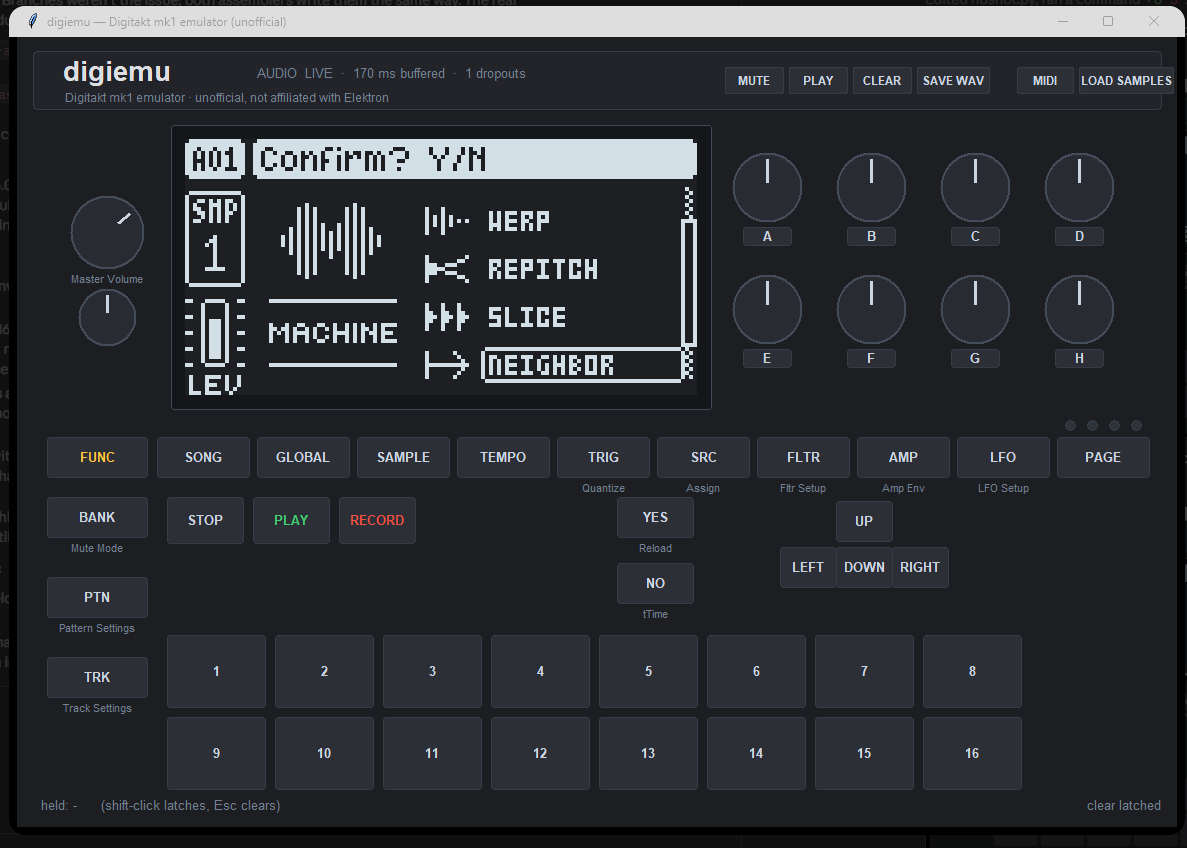
Pick the machine. On the track that should play another one (B):
FUNC+SRC, DOWN past SLICE to NEIGHBOR (the arrow icon), YES, YES.
The SRC page header reads NEIGHBOR.
-
Set its SRC page:
| knob |
|
| A: TUNE |
a pitch shifter, -24 to +24 semitones. The trig's note transposes it too, as it does a sample, so NEIGHBOR follows the keyboard and note locks. At exactly 0.00 (and no note transpose) the shifter is off and the source passes unchanged. |
| C: BR |
bit reduction, as for a sample |
| E: SLOT |
the source track, 1-8. 0, or B itself, is silence. |
| F: GAIN |
an amplifier after B's own chain, before its volume: 0 to +31.5 dB in 0.5 dB steps. It clips cleanly at full scale. |
| H: LEV |
the level into B's chain. 100 (with the trig's velocity at 100) passes the source at its own level; the curve is a sample's, so 127 is +4 dB (+6 with velocity 127), and velocity scales it. Unlike GAIN, it drives B's overdrive harder. |
All five are saved with the kit and take p-locks and LFOs (NEIGHBOR's
parameters are the SLICE machine's; GAIN is SLICE's LEN underneath).
-
Trig B. B's voice has to be started by its trigs, like any track.
Its amp envelope then shapes the source: a long HOLD or DECAY lets it
through for as long as you want.
-
Mix. The source (A) is tapped after its filter and before its
volume, so A's VOLUME is its dry level. Turn it to 0 to hear only B's
version.
B's overdrive, level, bit reduction, filter and envelope, volume, pan,
delay and reverb sends and LFOs all work on A's audio. It arrives one block
late: 32 samples, 0.67 ms. A chain (C → B → A) adds a block for each hop.
With TUNE on, the shifter adds 3 to 27 ms (13 on average).
Why B can be quieter than A. B's audio has already been through A's
chain, and B's chain then works on it again: B's filter, amp envelope,
overdrive and volume all apply on top of A's. For B at A's level, open B's
filter, give its envelope a long hold, match the volumes, or turn up GAIN.
Install
You need three things:
- elekloader:
- Windows: download
elekloader-<version>-windows.zip from
elekloader's releases,
unzip it and run elekloader.exe. The core mod, which every linkable mod
needs, is built in.
- Other systems: run elekloader from source with Python 3.9 or newer
(see its README). There
you also need core 2.1 for your OS,
core-2.1.elemod (1.53) or
core-2.1-os1.54.elemod (1.54), which are attached to this
repository's releases too.
- digineighbor 0.6 needs core 2.1 or later (its machine slots). The
Windows app builds with the core it bundles, so it needs a release
with core 2.1, and for OS 1.54 elekloader 0.4.0 or later.
- This mod, from
this repository's releases:
digineighbor-0.6.elemod for OS 1.53, digineighbor-0.6-os1.54.elemod
for OS 1.54. They are the same mod.
- The stock OS file your unit runs:
Digitakt_OS1.54.syx or
Digitakt_OS1.53.syx, from
Elektron's Digitakt downloads.
elekloader recognises it by its hash, and refuses a mod file made for
the other OS.
Then build your OS in elekloader's window:
- Change stock firmware... (top right): choose your stock OS file.
- + Install from file...: choose the digineighbor file for that OS.
From source, install its core the same way.
- Tick digineighbor. core is ticked with it. The check below the list
should say "No conflicts ... Ready to build". It links with
digislicer and
digihealth too: install and tick
them as well if you want them.
- OS version shown: the 4 characters the unit will show, for example
NB06.
- BUILD FIRMWARE, and save the
.syx. elekloader verifies it before
writing it.
Flash it with Elektron Transfer, as for any OS update
(Elektron's instructions):
- Connect the unit over USB.
- In Transfer, select the unit and Connect.
- Drag the
.syx onto Drop files here.
- Press YES on the unit.
Don't turn it off until the upgrade is done.
Or on the command line (elekloader from source):
python -m elekloader.patch --stock Digitakt_OS1.54.syx \
    --mod core-2.1-os1.54.elemod --mod digineighbor-0.6-os1.54.elemod \
    --out Digitakt_OS1.54-neighbor.syx --version NB06
Recovery: elekloader never changes the bootloader, so the stock OS
file always restores the unit. Hold FUNC while powering on for the
startup menu, and press TRIG 4 for OS UPGRADE. Then send the stock
.syx with Transfer's legacy OS upgrade mode.
A kit saved with a NEIGHBOR track should play that track silent on stock
firmware (not yet tried).
Build it from source
The Digitakt mk1 cross toolchain (m68k binutils and gcc; on Debian or
Ubuntu, apt install binutils-m68k-linux-gnu gcc-m68k-linux-gnu; on
Windows, inside WSL) and elekloader:
python -m elekloader.sdk.build . --stock Digitakt_OS1.53.syx       # -> out/digineighbor-0.6.elemod
python -m elekloader.sdk.build . --stock Digitakt_OS1.54.syx       # -> out/digineighbor-0.6-os1.54.elemod
python -m elekloader.lint out/digineighbor-0.6-os1.54.elemod --stock Digitakt_OS1.54.syx --with core-2.1-os1.54.elemod
| file |
|
mod.json |
the mod: its sites, its machine (in core's machine slots) and resources (machine 4); under ports, 1.54's sites |
neighbor.c |
the render's work: the tap, the inject, the pitch shifter, LEV and GAIN, GAIN's text |
glue.s |
the machine (its core descriptor, names and icon) and the patched sites: the SRC page (layout, labels, GAIN's knob), the render hooks |
os153.inc, os154.inc |
the stock code and data glue.s uses, for each OS (1.54's port defines OS154) |
os153.h, os154.h |
the same for neighbor.c |
How it works
The render. The stock OS keeps one mono block per track, 32 x 32-bit
samples, at 0x80001a18 + 128 t. Each stage runs over all 8 tracks before
the next: playback, overdrive, level/envelope, filter, then the mixer. So
the mod hooks two points:
- tap, just before the mixer: each NEIGHBOR track's block gets its GAIN,
then the blocks of the tracks NEIGHBOR tracks listen to are saved;
- inject, just after playback, in the next block: each NEIGHBOR track's
block is replaced with its source's saved one, pitch-shifted and scaled by
LEV. Its whole chain then runs on it.
A fifth machine. The OS has four SRC machines (ONESHOT, WERP, REPITCH,
SLICE, stored per sound). NEIGHBOR is machine 4, added through core's
machine slots (core 2.1): the mod gives core its names, its arrow icon, the
stock machine whose parameters it takes (SLICE's, so a change of machine
reaches the render) and the machine the render sees (4 itself). Core does
the rest: the menu lists it after SLICE and scrolls to it, the setter takes
it, and a loaded kit keeps it. The OS's voice start gives an unknown machine
an empty sample window, so B's own sample plays nothing. Other mods can add
machines alongside (digislicer's DIGISLICER is 5).
Up to 0.5 the mod patched the machine menu itself, and a kit loaded back
turned NEIGHBOR tracks into ONESHOT: the OS loads any machine past 3 as
ONESHOT. Core 2.1 keeps the machines mods add.
The page is a copy of SLICE's with PLAY, SAMP and GRID emptied, SLICE
shown as SLOT and LEN as GAIN. The page asks for its layout, with its own
track's machine, just before it draws or turns a knob. So the layout hook
remembers the machine, and the label and knob hooks use it. GAIN's knob
borrows BR's look and feel (a round knob, a value under it while turned) and
shows its value in dB.
TUNE. The pitch is the firmware's own for a sample: TUNE and the trig's
note go through the pitch table the playback uses (2048 steps an octave).
The shifter is a delay line (per track, 16-bit) read by two taps half a
1024-sample window apart. Their delays sweep at (1 - ratio) samples per
sample and wrap round the window, each faded in and out (a smoothstep) so
the two sum to 1.
A plain shifter like this splices with a phase jump at every wrap, which
pulls a tone off pitch by up to half the splice rate (in the emulator: +26
cents at +12, -55 at -12) and loses level. So when a tap wraps, while
silent, it looks up to ±128 samples around its new delay for the offset
where its waveform best matches the other tap's (a correlation, coarse then
fine), and fades in in phase.
LEV is the playback's own level law for a sample, (LEV/127)² ×
(velocity/127), scaled so that 100/100 is exactly 1.
GAIN is 10^(dB/20), ramped over a block when it changes, and saturating
at full scale. At 0 dB the block is left alone.
| site |
what |
0x400657cc |
the SRC page's layout: NEIGHBOR's own (TUNE, BR, SLOT, GAIN, LEV); remembers which machine's page is asking |
0x4000fe8a, 0x4000feac |
knobs E and F's labels and pop-up names on a NEIGHBOR page: SLOT/"Source Slot", GAIN/"Gain" |
0x40065794 |
GAIN's knob uses BR's UI record: its feel, and value text |
0x4000f324, 0x400657ee |
GAIN's value as text: "+6.5" under the knob, "+6.5dB" in the pop-up |
0x4000f2bc |
GAIN's knob drawn as BR's round one |
0x40077fba |
inject, after playback |
0x40078142 |
tap, before the mixer |
How it was checked
These checks ran in digikit's emulator, which runs the stock OS and the
mods through the real bootloader, with core, digihealth and digislicer
linked in too, and FAST AUDIO off and on:
- The menu: NEIGHBOR is listed and chosen, and stays after YES, YES.
Reopened, the menu scrolls to it.
- The page: TUNE, BR, SLOT, GAIN and LEV only; the pop-ups read
"Source Slot=1" and "Gain=+10.5dB". A real SLICE track's page is
unchanged.
- The routing: with TUNE at 0, in 449 of 449 blocks track 2's injected
block equals track 1's previous finished block, and it reaches the mixer
through track 2's chain.
- TUNE: a 1 kHz sine fed as the source comes out at 2000.00 Hz at +12,
500.00 at -12, 1498.3 at +7, 4000.0 at +24 and 250 at -24 (each spectral
peak within 2 cents), at level 0.997-0.999. A note of 67 gives +7, and so
does TUNE +12 with note 55. Back at 0.00, the output is bit-exact again.
- LEV and velocity: gains of 1.6129 (LEV 127), 0.2500 (LEV 50) and
0.6400 (velocity 64), as the law gives.
- GAIN: within 0.003 dB from +0.5 to +20 dB, clipping cleanly past
full scale; at 0 dB every block is untouched. From the panel, a brisk
turn moves it about 0.5 dB a notch.
- The cost: 650 instructions a block per NEIGHBOR track with TUNE at 0,
about 5,000 for a shifted track, and up to 11,400 in a block where a
splice is searched; the whole render is about 82,000.
- With no NEIGHBOR track, the audio and the audio engine's state are
identical to stock's at every render (4 scenarios).
- A cold boot against stock, through the machine menu to the NEIGHBOR
page: the audio is identical for the whole run (12.1 s). The screens
first differ when the machine menu opens, where NEIGHBOR is listed.
- On a unit: the routing (0.2) played track 1 through track 2 for about
13 minutes.
- 0.6 (core 2.1's machine slots), linked with core 2.1, digihealth and
digislicer 2.0:
- The menu lists NEIGHBOR after SLICE and DIGISLICER after it, each with
its icon; the cursor follows the machine, and the list scrolls to it.
- Chosen in the menu, the sound's machine is 4 and the render's too; the
page is SLICE's parameters; the source knob sets it, and track 2 is fed
450 blocks in 300 ms, as with 0.5.
- The firmware's sound loader keeps a stored machine 4.
- A cold boot against stock: the check's nine screens are identical, and
the audio too, apart from the recording's silent end being 1 ms longer.
- Not yet tried on a unit.
- OS 1.54 (the same mod, with 1.54's addresses), in the emulator:
- core + digineighbor against stock 1.54: every stage passes, and
the check's nine screens are identical.
- With core, digihealth and digislicer, against the same four for
1.53: the machine menu through to NEIGHBOR's SRC page is
identical, screen for screen.
The emulator's cold boot has no samples, so these runs play
silence: they check the screens and that nothing sounds, not
the audio of a playing sample.
- So the routing, TUNE and GAIN have not been run on 1.54. Their
render sites are where 1.53 has them; the two operands that moved
with the RAM (the inject site's lea, the tap site's addi) are
replayed from os154.inc. Not yet tried on a unit.
Limits
- The shifter works on 16-bit copies of the source (its top half).
- Noisy material (hats, noise) comes out 1.5-4 dB quieter when shifted:
the two taps can't line up with noise, and their fades then lose power.
Tonal material keeps its level.
- A change of TUNE between 0.00 and anything else switches the shifter in
or out, with a small jump (its delay).
- The SMP box on the left of the page, and the sample name in the header
after a track change, are still the track's sample's: they mean nothing
here.
- The source is one track's post-filter, pre-volume signal. There is no
choice of tap point, no stereo (tracks are mono), and no external input
yet.
- It uses about 27 KB of the 128 KB that elekloader mods share, mostly a
delay line per track.
Licence
GPL-2.0-or-later. digineighbor is free software: you can redistribute it
and/or modify it under the terms of the GNU General Public License as
published by the Free Software Foundation, either version 2 of the
License, or (at your option) any later version. It is distributed in the
hope that it will be useful, but WITHOUT ANY WARRANTY; without even the
implied warranty of MERCHANTABILITY or FITNESS FOR A PARTICULAR PURPOSE.
See the GNU General Public License for more details: LICENSE
holds version 2.
Not affiliated with Elektron. Digitakt is a trademark of Elektron. Custom
firmware is at your own risk.