elekloader
A mod loader for Elektron firmware. You pick mods and supply the stock OS
file Elektron publishes for your device. elekloader builds a custom OS
file on your own machine, and you flash it the way you flash any OS update.
- Nothing from Elektron is distributed. A mod (
.elemod) carries only
its author's bytes, the short instruction fragments needed to hook the OS,
and hashes of the stock bytes it expects. Every build starts from your own
stock file, recognised by its hash.
- The bootloader is never touched. Mods can only change the main OS:
the file format has no way to say anything else. Each output file is
re-read and verified before it is written. So the stock OS file always
recovers the device.
- Mods are checked against each other before anything is built. Two
mods may not touch the same bytes, claim the same memory or the same
named resource, or leave a requirement unmet.
| Device |
OS |
Status |
| Digitakt (mk1) |
1.53, 1.54 |
supported |
| Digitakt II |
1.17 |
experimental: whole builds (format-1 mods) and linkable mods with its own core (the hook bus's tick, draw, key and encoder events), sealed as the unit checks them; boots in digikit's emulator; core with a key-swap mod works on a unit (Transfer over USB) |
| Digitone (mk1) and Digitone Keys |
1.43, 1.44 |
supported |
| Octatrack (MKI and MKII) |
1.40C |
supported: whole builds (format-1 mods); linkable mods with its own core: boots on an MKII, not yet run on an MKI |
| other Elektron devices |
|
planned: see docs/DEVICES.md |
Install
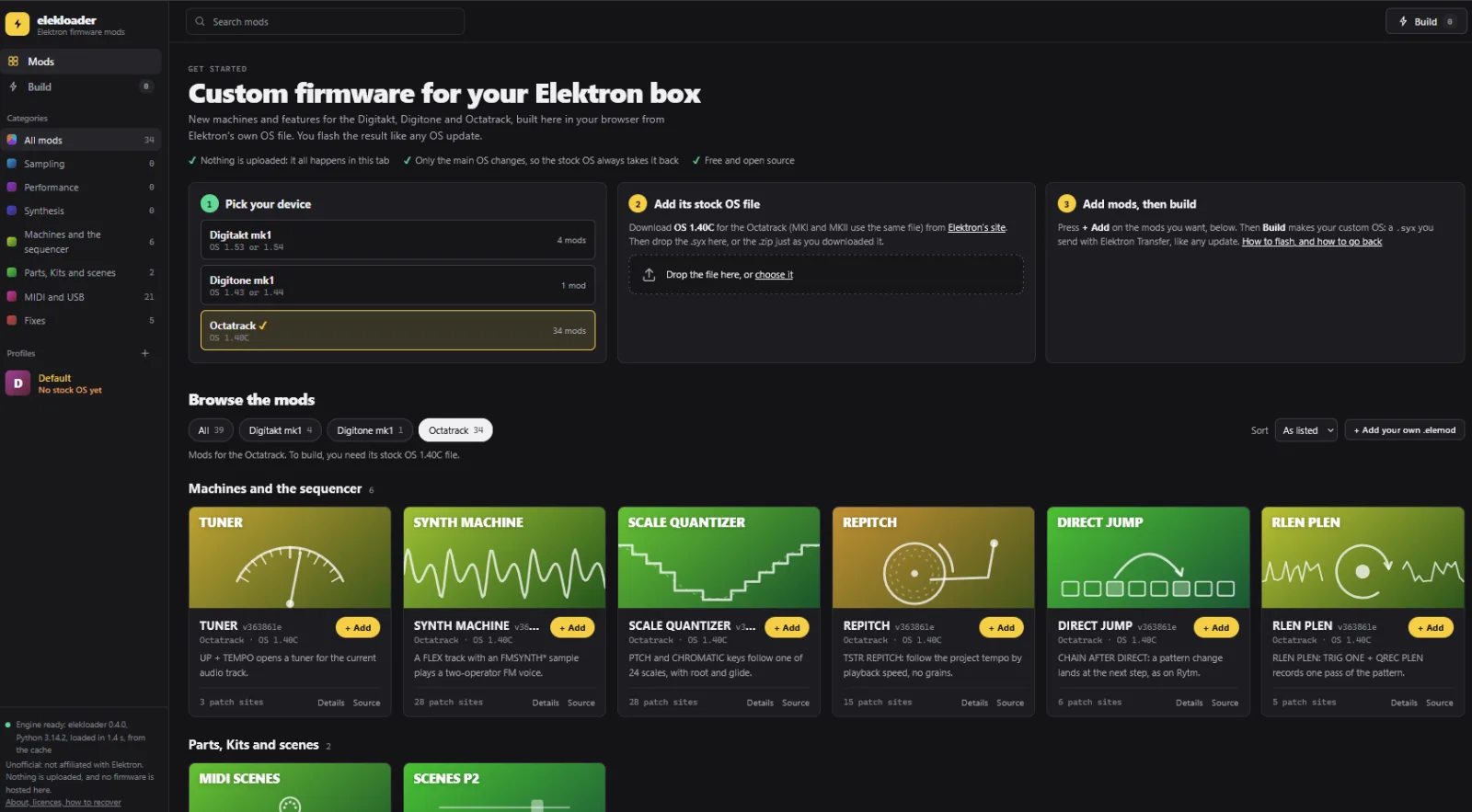
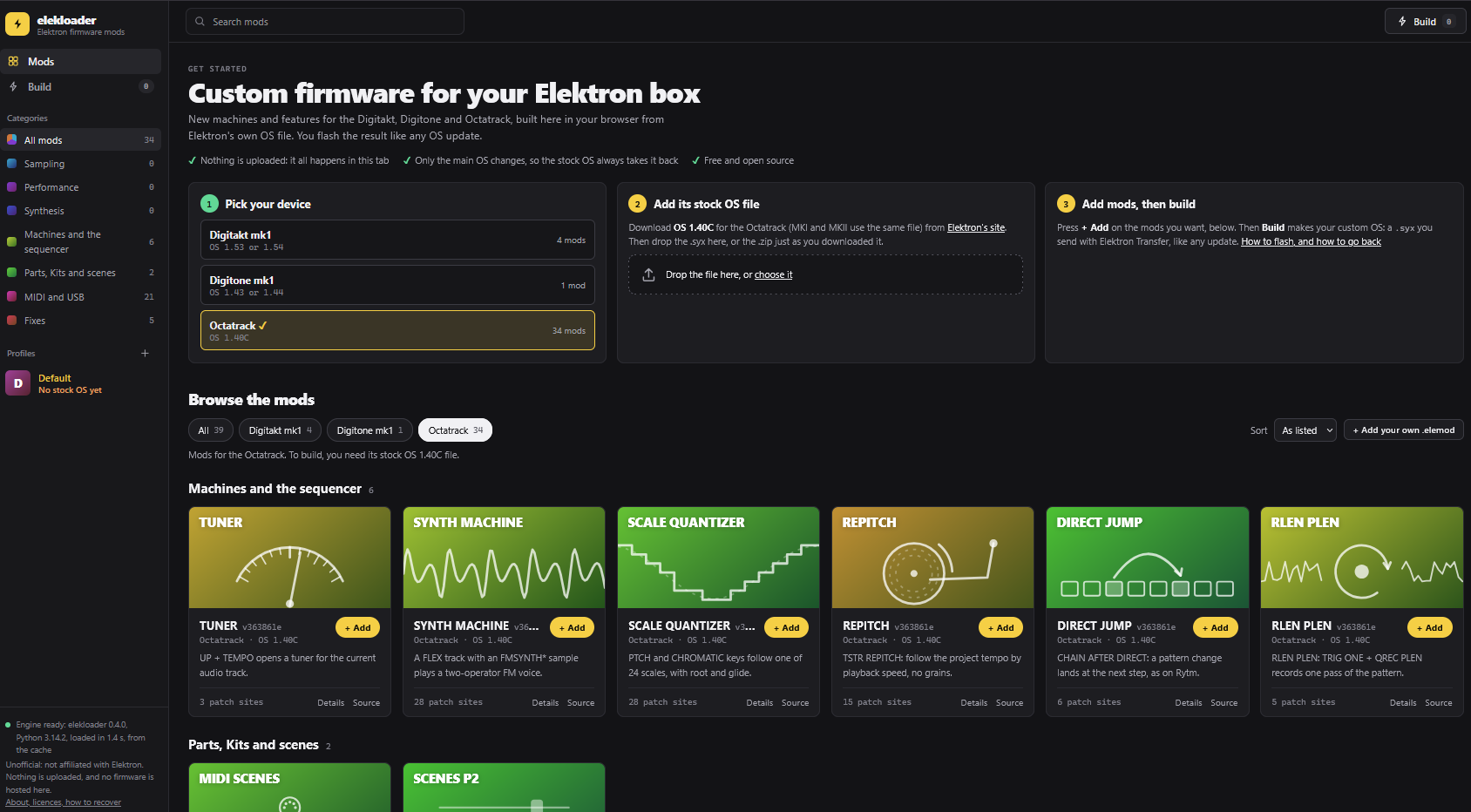
In your browser, nothing to install: https://irpina.github.io/elekloader/.
Drop in your stock OS file, add mods from its library or your own, tick them,
build, and download the .syx (and, for the Octatrack, the .bin). The build runs in the page, in
Python compiled to WebAssembly (Pyodide), with
elekloader's own code, unchanged. The page shows its version and commit, and
whether that is the latest release's. Your files are never uploaded, the
site hosts no firmware, and it fetches nothing from any other site. The
latest release's core for your device is listed and ticked for you. See
docs/WEB.md.
Windows: download elekloader-<version>-windows.exe from
Releases and run it.
There is nothing to install and no Python needed. The first time, it asks
for your stock OS file (below). The core mod is built in: it is listed in the window, and ticked for you
with any mod that needs it. The exe is not signed, so Windows may say it
protected your PC: choose More info, then Run anyway.
macOS: download elekloader-<version>-macos.dmg from
Releases, open it,
and drag elekloader to Applications. It runs on Apple silicon and
Intel Macs, with no Python needed, and it is signed and notarized by Apple.
As on Windows, the first time it asks for your stock OS file, and core is
built in.
Any system, from source: Python 3.9 or newer, nothing else to install
(on Linux, Tkinter may be a separate package, such as python3-tk).
Download or clone this repository, then:
python -m elekloader                        # the window
python -m elekloader.patch --stock Digitakt_OS1.53.syx --mod core-2.1.elemod --mod a.elemod --out custom.syx --version 2.0a
python -m elekloader.patch --stock Digitakt_OS1.53.syx --mod core-2.1.elemod --mod a.elemod --check
With pip install . the same commands are elekloader and elekpatch.
From source, core is not built in. Take your device's from
Releases (or build
it, below), and install it like any mod. There is one per device and OS:
| device |
OS |
core |
| Digitakt mk1 |
1.53 |
core-2.1.elemod |
| Digitakt mk1 |
1.54 |
core-2.1-os1.54.elemod |
| Digitone mk1, Digitone Keys |
1.43 |
core-dn1-2.0a.elemod |
| Digitone mk1, Digitone Keys |
1.44 |
core-dn1-2.0a-os1.44.elemod |
| Digitakt II |
1.17 |
core-dt2-1.0.elemod |
A mod is made for one OS version: one built for 1.53 is refused with a 1.54
stock file, and its author has to build it for 1.54 (docs/ADAPTING.md,
"Another OS version").
You also need the stock OS file for your device, exactly as Elektron
publishes it:
- Digitakt mk1:
Digitakt_OS1.54.syx or Digitakt_OS1.53.syx, from
Elektron's Digitakt downloads;
- Digitakt II:
Digitakt_II_OS1.17.syx, from
Elektron's Digitakt II downloads;
- Digitone mk1 or Digitone Keys:
Digitone_and_Digitone_Keys_OS1.44.syx or
..._OS1.43.syx (one file serves both), from Elektron's Digitone downloads;
- Octatrack MKI or MKII:
OCTATRACK_OS1.40C.syx or OCTATRACK_OS1.40C.bin
(one file serves both), from Elektron's Octatrack downloads.
The .zip Elektron's site gives you works as it is. elekloader recognises
the file by its hash.
Build a custom OS
- Your stock OS file: the first time, elekloader asks for it (a
.syx,
a .bin or Elektron's .zip); Change stock firmware... (top right)
picks another. The header then shows the device and OS version with a
tick. Mods made for another device or OS version are hidden unless you
tick Show mods for other firmware.
- + Install from file...: add the
.elemod files of the mods you want.
They are copied into your library.
- Tick the mods (or double-click them). Each mod's status shows as you
go: Enabled, Conflict, Needs another mod, or made for other firmware.
The check below the list says when the set combines: "No conflicts ...
Ready to build".
- OS version shown: what the unit will show as its OS version: 4
characters on the Digitakt mk1 and the Digitone mk1, 1 to 10 on the
Octatrack.
- BUILD FIRMWARE: choose where to save the
.syx. elekloader builds it,
verifies it (see below), and shows its sha256. For the Octatrack it also
writes the card file, the .bin beside it.
The details pane shows each mod's description, every change it makes
(patch sites, the events it handles, its memory) and what it requires.
Profiles save a set of ticked mods. Your library, profiles and the stock
file you chose last are kept in %APPDATA%\elekloader (Windows) or
~/.elekloader.
Flash it
Send the .syx to the unit the way Elektron describes for OS updates
(How to update your device).
For the Digitakt mk1, the Digitakt II and the Digitone mk1:
- Connect it over USB and open Elektron Transfer.
- Select the unit and Connect.
- Drag the
.syx onto Drop files here.
- Press YES on the unit.
Don't turn the unit off until the upgrade is done.
For the Octatrack, from the card (back it up first):
- PROJECT > SYSTEM > USB DISK MODE, and copy the
.bin to the root of
the card.
- Eject the card on the computer, then leave USB DISK MODE on the unit.
- PROJECT > SYSTEM > OS UPGRADE, and confirm.
- When it restarts, power-cycle it once more before judging anything.
Recovery: the bootloader is never changed, so the stock OS file always
restores the unit. If a custom OS will not start on a Digitakt mk1, a
Digitakt II or a Digitone mk1, hold FUNC while powering on for the
startup menu, and press TRIG 4 for OS UPGRADE.
Then send the stock .syx with Transfer's legacy OS upgrade mode (on the
Digitakt II, over its MIDI ports: not USB). On the
Octatrack: hold FUNC while powering on, press TRIG 3 for MIDI
UPGRADE, and send the stock .syx over 5-pin DIN MIDI (USB MIDI does not
work for this).
What a build guarantees
The output is refused unless every one of these holds:
- It is your stock file with only the main OS section changed. The other
sections, bootloader included, are byte for byte stock. The header
differs only in its 4-character version field; the framing only in its
message count.
- Every message checksum, counter and the content checksum are right, and
the container fits the device's flash budget.
- The main OS unpacks to exactly the patched image, simulated the way the
bootloader does it: in place, over its own staged copy.
For the Digitakt mk1, the writer produces the same bytes as
elektron-firmware-tool when given the same main OS stream. For the Digitone
mk1 (the same file family, with seven sections), it reproduces the stock
file from its own main OS stream.
The Digitakt II's files are sealed: the container ends in an HMAC-SHA256 of
the rest, which its bootstrap checks before it flashes anything. elekloader
derives the key from your stock file's bootstrap, as the unit does, seals
the output, and checks the seal again. From its own main OS stream, the
writer reproduces the stock file byte for byte.
The Octatrack's files are checked the same way: the container header
differs only in its 10-character version field, every SysEx message's
checksum and the card file's checksum are right, and the .syx and .bin
carry the same container. The copy of the bootloader that the OS can
re-flash (0x400de1e0-0x400e21e0) must stay stock. The in-place unpack is
not simulated there: where its bootloader stages the image is not known
yet. From their own main OS stream, the writer reproduces Elektron's
.syx and .bin byte for byte.
Mods
Users install mods from their .elemod files.
docs/FORMAT.md describes both kinds:
- format 1: a whole custom build as one file;
- format 2: separate, linkable mods. A
core mod provides a hook
bus; other mods subscribe to its events and add entries to each other's
tables. The loader's linker places them, resolves their symbols and
checks them.
Every set of format-2 mods needs the core mod for its device. The
Windows and macOS apps have them built in, and each release carries them:
one source, mods/core/core.s, built with each device's addresses
(mods/core for the Digitakt mk1, mods/core-dn1
for the Digitone mk1, mods/core-dt2 for the Digitakt II).
Each mod.json gives the addresses of every OS it
supports (its os, and its ports): the stock file you build with picks
them. The Octatrack's, mods/core-ot, has a source of its
own: it reserves RAM for mods, copies their code there, and from 0.2 has a
hook bus with the Octatrack's events. To build one yourself, use the SDK
(below):
python -m elekloader.sdk.build mods/core --stock Digitakt_OS1.54.syx                          # the Digitakt mk1's (or 1.53)
python -m elekloader.sdk.build mods/core-dn1 --stock Digitone_and_Digitone_Keys_OS1.44.syx   # the Digitone mk1's (or 1.43)
python -m elekloader.sdk.build mods/core-dt2 --stock Digitakt_II_OS1.17.syx                      # the Digitakt II's
python -m elekloader.sdk.build mods/core-ot --stock OCTATRACK_OS1.40C.syx                    # the Octatrack's
Files from before version 0.2 used the .dtmod extension; they still load.
Adapting your mod to elekloader
See docs/ADAPTING.md: the path to take, the rules,
each command with the output it should print, a table from every refusal
to its fix, and a definition of done. Coding agents: start with
AGENTS.md.
The tools, in brief:
python -m elekloader.sdk.build examples/hello-marker --stock Digitakt_OS1.53.syx   # sources -> .elemod
python -m elekloader.lint my-mod-1.0.elemod --stock Digitakt_OS1.53.syx --with core-2.1.elemod
python -m elekloader.mkmod ...                                                      # a whole build -> .elemod
python -m elekloader.sdk.octabam --octabam octabam --stock OCTATRACK_OS1.40C.syx    # octabam modules -> .elemod
For the Octatrack, elekloader.sdk.octabam converts
sambanks/octabam's ColdFire modules
into linkable mods. It checks each one against octabam's own account of
its bytes. See docs/ADAPTING.md, section 4b.
examples/hello-marker/ is a complete mod to start from. It is one C
function on the draw event, and it puts a small square in the corner of
every screen (examples/hello-marker-dt2/ builds it for the Digitakt II).
examples/perform-direct/ is a real Digitakt II mod: [PRESET] toggles
PERFORM without [FUNC]. Building code needs the device's cross toolchain;
for the Digitakt mk1 and the Digitakt II that is m68k binutils and gcc (Homebrew's m68k-elf-* work, with
ELEKLOADER_CROSS=m68k-elf-).
The Windows app
packaging/build_windows.py --core core-2.1.elemod [core-dn1-2.0a.elemod ...] builds
elekloader.exe with PyInstaller (packaging/requirements-build.txt). The
exe carries the cores in elekloader/bundled. The script checks the exe with
its --selftest (the version, Tk, the built-in cores and their hashes, the
devices it supports), then writes elekloader-<version>-windows.exe and
SHA256SUMS.txt.
The windows-build workflow (Actions, run by hand with a release's tag)
does the same on GitHub's Windows runner. It takes every core*.elemod from that
release and attaches the exe and SHA256SUMS.txt to it. core is built where
the stock OS file is and attached to the release first. No firmware
reaches the workflow.
The macOS app
packaging/build_macos.py --core core-2.1.elemod [...] builds
elekloader.app the same way, universal2 (Apple silicon and Intel; it needs
a universal2 Python, such as python.org's). With --identity (a Developer
ID Application certificate in your keychain) every binary in it is signed
with the hardened runtime; without, it is signed ad hoc, for trying on
your own Mac. It runs the app's --selftest as it will ship, signed, then
writes elekloader-<version>-macos.dmg and SHA256SUMS.txt. --notarize
has Apple notarize the app and the .dmg and staples both, with an App Store
Connect API key in NOTARY_KEY (the .p8 file), NOTARY_KEY_ID and
NOTARY_ISSUER.
The macos-build workflow (Actions, run by hand with a release's tag, like
windows-build) does all of that on GitHub's macOS runner and attaches the
.dmg to the release, adding its line to SHA256SUMS.txt. With test
ticked, it builds the branch it is run on with the given release's cores,
signs, notarizes and self-tests it the same way, and keeps the .dmg as the
run's artifact instead of attaching it: a check of the signing before a
release. It needs these repository secrets:
| secret |
what |
MACOS_CERTIFICATE |
the Developer ID Application certificate with its private key, exported from Keychain Access as a .p12, base64-encoded |
MACOS_CERTIFICATE_PASSWORD |
the password the .p12 was exported with |
NOTARY_KEY |
an App Store Connect API key's AuthKey_<id>.p8, its text as it is |
NOTARY_KEY_ID |
that key's ID |
NOTARY_ISSUER |
the Issuer ID shown above the keys in App Store Connect |
Tests
python tests/test_units.py        # needs nothing
ELEKLOADER_STOCK=Digitakt_OS1.53.syx ELEKLOADER_MODS=path/to/mods python tests/test_link.py
ELEKLOADER_STOCK=... ELEKLOADER_STOCK_154=Digitakt_OS1.54.syx ELEKLOADER_MODS=... python tests/test_sdk.py   # the example needs the cross compiler
ELEKLOADER_RELEASES=folder/of/stock/files python tests/test_releases.py   # every known release, and its cores
ELEKLOADER_STOCK=... ELEKLOADER_BUNDLE=bundle.elemod ELEKLOADER_CTOOL_SYX=its-build.syx python tests/test_patcher.py
ELEKLOADER_OT_SYX=OCTATRACK_OS1.40C.syx ELEKLOADER_OT_BIN=OCTATRACK_OS1.40C.bin python tests/test_octatrack.py
ELEKLOADER_OT_SYX=... ELEKLOADER_OCTABAM=path/to/octabam python tests/test_octabam.py   # octabam optional
ELEKLOADER_DN_SYX=Digitone_and_Digitone_Keys_OS1.43.syx python tests/test_digitone.py
ELEKLOADER_DT2_SYX=Digitakt_II_OS1.17.syx python tests/test_digitakt2.py
ELEKLOADER_STOCK=... ELEKLOADER_STOCK_154=... ELEKLOADER_OT_SYX=... ELEKLOADER_MODS=... python tests/test_gui.py   # the window, hidden (Tk)
node tests/test_web.mjs build/site   # the web page's engine, in Pyodide (packaging/build_web.py first)
A test whose input files are not given is skipped, not passed. Firmware
files never go in this repository.
Licence
GPL-2.0-or-later. See LICENSE, and NOTICE for the code that
comes from digikit and for the credits. elekloader is not affiliated with
Elektron. Flashing custom firmware is at your own risk.