digiemu — a Digitakt mk1 and Digitone mk1 emulator
digiemu runs the Elektron Digitakt (mk1)'s and Digitone (mk1)'s own firmware
on a Windows PC or an Apple silicon Mac. An emulated ColdFire CPU boots the
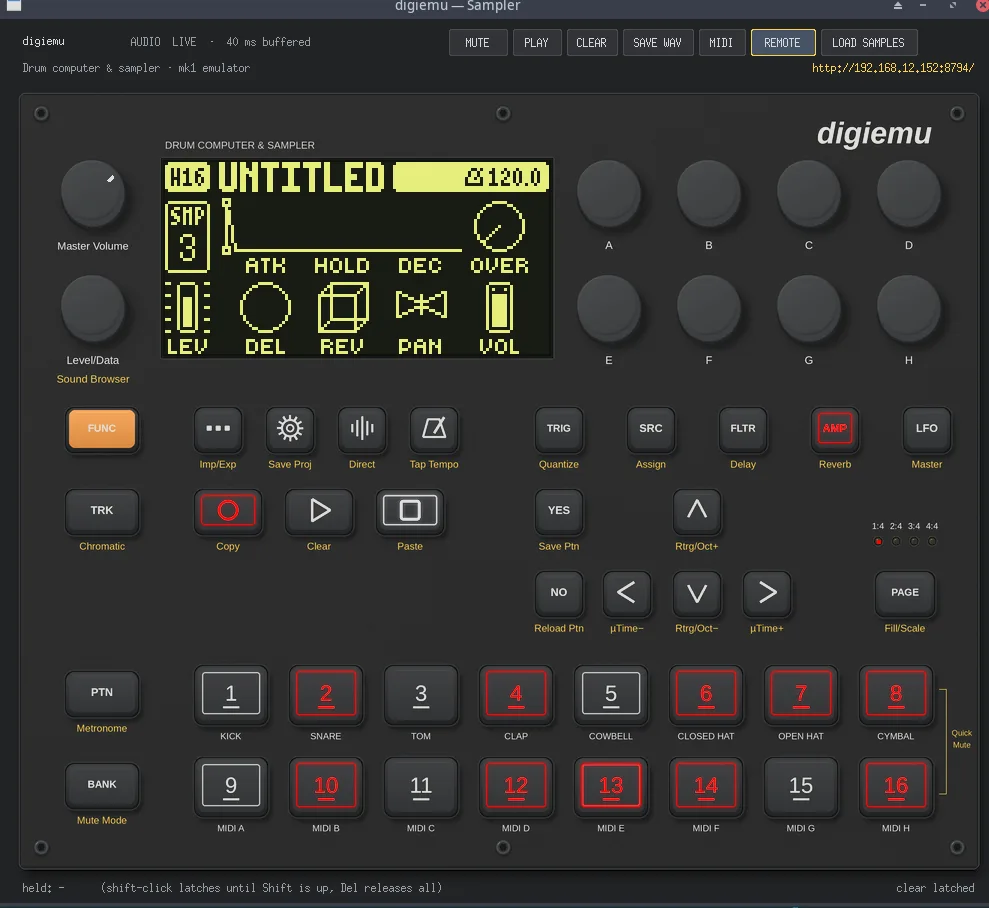
real operating system to its live user interface, and a clickable front panel
plays it: the screen, every key and encoder with the key LEDs, the sequencer,
the +Drive, and live 48 kHz audio. On the Digitone a second emulated CPU runs
the firmware's own FM voice engine, and the Digitone has a window of its own.
You bring the firmware. digiemu contains none of Elektron's code, and it is
not affiliated with or endorsed by Elektron.
Quick start (Windows)
- Download
digiemu-win64-<version>.zip from
Releases and unzip it
anywhere you can write to, except a OneDrive folder.
- Get the firmware from Elektron's website:
Digitakt_OS1.53.syx for the
Digitakt, or Digitone_and_Digitone_Keys_OS1.44.syx (or 1.43) for the
Digitone.
- Run
digiemu.exe, click Add firmware and pick the .syx.
- When it says the firmware is ready, click Play.
Step 3 takes about 25 seconds on a desktop (longer on a slow laptop), once
per firmware. digiemu identifies the device and version from the file itself,
prepares an emulated +Drive, and runs the firmware's own first boot, which
installs the factory project and sounds onto it. From then on, Play opens
that device's panel straight away, and closing the panel saves the session
so the next Play carries on where you left off. Both devices can be set up
side by side.
The exe is not code-signed, so Windows shows a SmartScreen prompt the first
time, and a PC with Smart App Control turned on blocks it.
Quick start (macOS)
- Download
digiemu-macos-arm64-<version>.dmg from
Releases, open it, and drag
digiemu to Applications. It runs on Macs with Apple silicon (M1
or later), and it is signed and notarized by Apple: the first time, macOS
asks whether to open it, as it does for any app from the internet.
- Get the firmware from Elektron's website, as above.
- Open digiemu, click Add firmware and pick the
.syx.
- When it says the firmware is ready, click Play.
Everything else works as on Windows. The app keeps your firmware folders,
sessions and logs in ~/Library/Application Support/digiemu, since nothing
may be written inside the app itself.
Using the panel
- Keys: click to press. Shift-click latches a key, for combinations
such as FUNC + a trig; Esc (or clear latched) releases them.
- Encoders: mouse wheel or drag. Click the letter under a knob to push it.
- Master Volume (top left): mouse wheel or drag. A software gain on
the live output and on PLAY's replay, from silent up to 1.5× (which can
clip). The real knob is analog, so the firmware never sees it.
- Audio: MUTE silences the live output. PLAY replays what has been
recorded, CLEAR empties the recording, and SAVE WAV writes it to a file.
- MIDI: the DIN MIDI IN and OUT ports. The MIDI button picks a device to
play from and one to send to, and the choice is kept for next time. On
Linux and macOS there are also virtual ports named after the device, for
a DAW. Windows has no virtual MIDI ports, so there a DAW connects through
a loopback port (made with loopMIDI, for example) picked like a device.
The firmware's own MIDI CONFIG still applies: after setup, PORT CONFIG >
INPUT FROM is USB only, so set it to MIDI (and OUTPUT TO, for MIDI out).
The Windows and macOS apps include MIDI; from source it needs
uv sync --extra midi.
- LOAD SAMPLES (Digitakt only): see below.
Both windows share one plan: Master Volume and LEVEL/DATA at the top
left, the screen, the eight encoders, and one row of keys under them with
the parameter pages and PAGE. The Digitone window has its own
keys (SYN1, SYN2, VOICE, KEYBOARD, T1–T4, MIDI). The Digitone has no
sample engine, so it has no LOAD SAMPLES.
Loading samples
LOAD SAMPLES picks one or more WAV files and puts them in /incoming on the
+Drive, where the Digitakt's sample browser finds them. Any WAV with 8-, 16-,
24- or 32-bit integer samples or 32-bit float samples works, at any sample
rate. Stereo is mixed down to mono, as on the hardware.
The firmware reads the +Drive's file index only when it starts, so loading
restarts it: digiemu saves and closes the session, writes the samples,
rebuilds (about 15 seconds) and opens the panel again. Changes to the
project that you have not saved on the Digitakt may be lost, so save first.
A sample keeps its file name, without the extension, up to 64 characters. A
name the Digitakt would confuse with one already there gets -2, -3 and so
on. Files that cannot be loaded are listed and left out before anything
restarts.
Your firmware folders
Everything lives next to the exe, in firmware\<name>\: your .syx, the
+Drive image (plusdrive.img), the snapshots and the logs. You can move or
copy the whole digiemu folder. On the Mac the same folders are in
~/Library/Application Support/digiemu/. Do not share anything inside
firmware: it is derived from Elektron's firmware.
- Rebuild starts the firmware again from its +Drive as it is now. Your
projects and samples stay; the saved session does not.
- Reset to factory deletes the +Drive image and sets the firmware up
again from scratch.
Command line
digiemu-console.exe does the same without the window, which is what a CI
job testing a custom firmware build wants:
digiemu-console.exe --add FILE.syx [--yes]   set up a firmware (--yes: accept an untested release)
digiemu-console.exe --list                   list what is set up here
digiemu-console.exe --rebuild NAME           start one again from its +Drive
digiemu-console.exe --reset NAME --yes       reset one to factory
digiemu-console.exe --check FILE.syx         check a build before you flash it (exit 0: it passed)
    [--baseline STOCK.syx] [--timing]        compare with this stock build; also time the audio
On the Mac the same program is /Applications/digiemu.app/Contents/MacOS/digiemu,
with the same options. --home DIR uses another data folder. Setting up takes about 23 seconds on
the reference desktop, or about 13 seconds on a +Drive that already holds
the factory content.
Checking a custom build before you flash it
In the app, Check firmware... takes the build's .syx and compares it
with the stock firmware you have set up here (or another stock .syx you
pick). A check takes a few minutes, runs in the background, and ends with
PASS or FAIL and the reasons. Its report stays in checks/ next to
digiemu.exe (on the Mac, in ~/Library/Application Support/digiemu/).
From source, emu.fwcheck does the same from the command line:
python -m emu.fwcheck CUSTOM.syx --baseline STOCK.syx --out check
It checks the file as the device receives it (every checksum, the section
table, and a bootstrap version that would make the device rewrite its
bootstrap). It runs the build's own bootstrap from the flash, then boots
the OS from where that leaves it. Then it drives the build with a key
script under a stricter emulator:
- it holds the firmware to the MCF5441x's memory map, instruction set and
exceptions;
- it times the firmware in core cycles, so the audio render is checked
against its deadline;
- it compares every screen and sample with the stock build's.
docs/FIRMWARE-CHECK.md says what a pass means and
what no emulator run can tell you.
Status
digiemu is tested with Digitakt mk1 OS 1.53 (SHA-256
9bdd44bb6102fb25c143cfab97bc92b7a89c463f795d3112dce89771e29bcc92) and
Digitone mk1 OS 1.43 (SHA-256
c5a54cc05b921f2e4bd814834c5365c2a5aa01d7772a9a2961fac1c3095bf9aa) and
1.44 (SHA-256
d4f200d04484333d82822db7744e6484d0def8f2db8ddf55ee2b780cc13c9659). Other
releases of the two are offered as untested and run once you confirm. Other
Elektron products are recognised and turned away for now.
Works: booting to the live user interface; every key, encoder and key
LED; the sequencer and patterns; the +Drive with projects (and, on the
Digitakt, samples); live 48 kHz audio. On the Digitone the FM voices are
rendered by its second CPU's own code, on a thread of its own. A desktop
runs about 2.5 times faster than the Digitakt needs, which leaves headroom
for live audio; the Digitone also uses most of a second core.
tools/capbench.py measures a given PC.
Not yet:
- The Digitakt's factory sample library lives on the real device's
storage, not in the firmware, so
/factory is empty and sounds that use
it are silent.
- Whether a 44.1 kHz sample plays at the right pitch is not checked yet. A
48 kHz sample's rendered output has been checked against its source.
- The Digitone runs as a plain Digitone: the Digitone Keys' keyboard, wheels
and extra keys are not there.
- Some interrupt-controller behaviour is approximated rather than modelled.
- The macOS app passes its self-test, but playing a firmware in it has not
been tested yet. There is no build for Intel Macs.
docs/STATUS.md has the details and the list of open work.
From source
You need Python 3.12 (with uv), a C toolchain
to build the patched Unicorn engine (docs/UNICORN.md), and
your own .syx. Tested on Windows 11 and on Linux (WSL2).
uv sync
tools/install-patched-unicorn.sh           # Windows: tools\install-patched-unicorn.ps1
uv run python -m emu.portable              # the app, with its data in portable/
uv run python -m emu.portable --add Digitakt_OS1.53.syx   # or set up without the window
The emulator does not run without the patched Unicorn. Of the six patches in
patches/, three fix how Unicorn emulates the ColdFire's
flags and its multiply-accumulate unit, and three make it fast enough for
live audio.
To work on the emulator itself (the panel on its own, the boot tools, the
tracing tools), start with DIGITAKT-MK1.md;
DIGITONE-MK1.md covers what the Digitone adds.
Building the Windows app
powershell -NoProfile -ExecutionPolicy Bypass -File tools\build-windows.ps1 `
    -BuildVenv ..\.venv-build -SitePackagesFrom <site-packages with PyInstaller> `
    -Out ..\build-out
The build is offline. It bundles the patched Unicorn from this checkout's
.venv, clears the exes' Control Flow Guard flag (Unicorn's longjmp fails
under it; the process then has the same protections as python.exe), and
runs a self-test of both exes before it writes the zip. The script's header
and packaging/ explain each step.
Building the macOS app
python3.12 -m venv ../venv-mac
../venv-mac/bin/pip install -r requirements.txt -r requirements-build.txt
PYTHON=../venv-mac/bin/python tools/install-patched-unicorn.sh
tools/build-macos.sh --python ../venv-mac/bin/python --out ../build-out-mac \
    [--identity "Developer ID Application: ..." [--notarize]]
It builds digiemu.app for Apple silicon with
packaging/digiemu-macos.spec, signs it (ad hoc without --identity, which
is for trying it on that Mac only), runs the self-test on the signed app,
audits it, and makes digiemu-macos-arm64-<version>.dmg, auditing the app
again from inside the .dmg. It is signed with the hardened runtime and one
entitlement, com.apple.security.cs.allow-jit: Unicorn translates the
firmware's code as it runs, and without it cannot allocate the buffer for
that code. --notarize has Apple notarize the app and the .dmg, with an App
Store Connect API key in NOTARY_KEY, NOTARY_KEY_ID and NOTARY_ISSUER.
The script's header explains each step.
Releasing
Releases are built by GitHub Actions
(.github/workflows/release.yml):
- Bump
APP_VERSION in emu/portable.py in a pull request. Optionally add
the release notes as docs/releases/vX.Y.Z.md. Then merge it.
- Tag the merge commit and push the tag:
git tag vX.Y.Z origin/main && git push origin vX.Y.Z.
- On a Windows runner, the workflow checks that the tag matches
APP_VERSION, builds the patched Unicorn from source, and runs
tools/build-windows.ps1 with the build tools pinned in
requirements-build.txt. On a macOS runner it does the same with
tools/build-macos.sh, which signs and notarizes the app. It then
attaches the zip, the .dmg and SHA256SUMS.txt to a draft release
for the tag.
- Review the draft and publish it.
Signing the macOS app needs five repository secrets: MACOS_CERTIFICATE
(the Developer ID Application certificate with its private key, exported as
a .p12, base64-encoded), MACOS_CERTIFICATE_PASSWORD, and an App Store
Connect API key for notarizing: NOTARY_KEY (the .p8 file's text),
NOTARY_KEY_ID and NOTARY_ISSUER.
A pull request that changes the build runs the same builds without
releasing anything, and keeps the zip and the .dmg as workflow artifacts.
A pull request from a fork has no secrets, so its app is signed ad hoc and
not notarized.
Tests
tools/ci/run-tests.sh [PYTHON] runs every test module on its own. Tests that
need the firmware skip without it, and none of the test data comes from
Elektron. CI runs the tests and a content guard, which rejects firmware,
snapshots, card images and any file over 1 MB, on every pull request.
Documentation
|
|
| docs/STATUS.md |
What works, what does not, and the open work |
| docs/FIRMWARE-CHECK.md |
Checking a custom build before it goes on a device: what emu.fwcheck checks and what it cannot |
| DIGITAKT-MK1.md |
How the mk1 emulation works: boot, panel, audio, sequencer, and the tools |
| DIGITONE-MK1.md |
The Digitone: its second CPU, card, panel and measurements |
| docs/mk1/ |
The firmware reference: 01–09 are generated, 10 onwards written by hand |
| patches/README.md |
The six Unicorn patches |
| docs/TOOLS.md |
The reverse-engineering tools |
| docs/history/ |
Dated session handoffs, newest first |
Relationship to digikit
digiemu is derived from m-dwyer/digikit
at upstream commit a5643ba. Upstream targets the Digitakt II and Digitone
II, and those paths still work: every mk1 behaviour is selected by the device
file (devices/digitakt.toml), and a device file that says nothing keeps
upstream's behaviour. Upstream's README is
docs/UPSTREAM-README.md, and its research notes are
docs/FINDINGS.md and the
upstream handoffs.
This repository is published as one snapshot rather than with digikit's
history. Not included: Elektron firmware, anything extracted from it
(sections, snapshots, card images), and any tooling for building, signing or
patching firmware images.
Licence
GPL-2.0-or-later (LICENSE). The patches in patches/ modify QEMU
source vendored inside Unicorn, so they carry its licence.
The licence covers the code here and nothing else. No Elektron firmware is
included; it is copyright Elektron. Nothing here grants any right to
Elektron's software, and nothing here is legal advice.
Container-format knowledge derives from mischa85/elektron-firmware-tool
(MIT). Architecture and memory-map facts marked Documented in
docs/FINDINGS.md derive from lalzart/digitakt-ii-firmware-research-public
(MIT). MIT is GPL-compatible, so both carry forward under this licence.