
Gearmulator MD/MM
Emulations of Elektron's Machinedrum + Monomachine. My fork of TUS's gearmulator. Please don't bug them for support :)
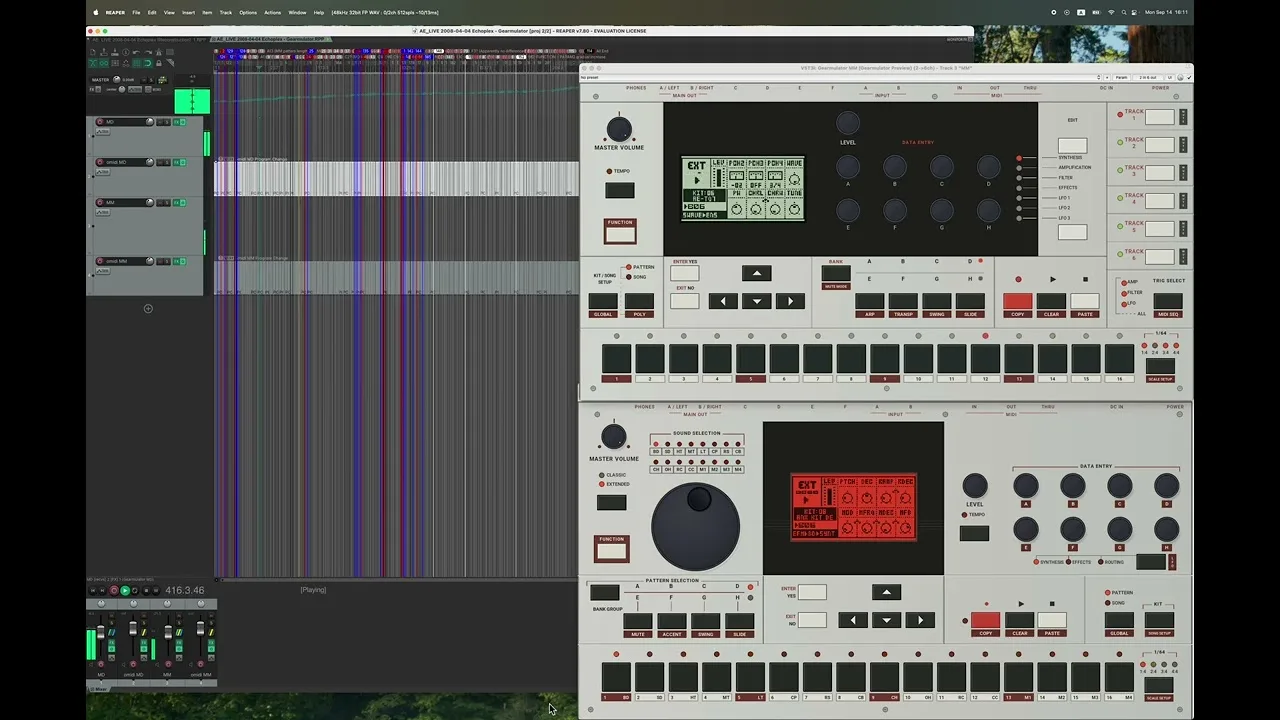
About
Highlights
- Virtual Machinedrum and Monomachine panels: shift-click holds keys, Alt/Option-click presses the encoders
- Send SysEx File from the right-click menu, with progress
- Route audio from your DAW into the machine's inputs and sampling
- Standalone, VST3 (also multi-output) and Audio Units on the Mac
- Downloads for macOS (Apple silicon and Intel), Windows x64 and Linux x64
What you need
Firmware and ROM files from hardware you own. They are not included, and the author asks not to request or share them.
Good to know
Alpha releases: back up important projects before updating. Support questions go to this fork, not to the Gearmulator team. The Linux builds need glibc 2.38 or newer.
README
My fork of TUS's Gearmulator project, where I add emulations of Elektron's Machinedrum and Monomachine.
I'm not affiliated with TUS or Elektron. Don't bug them for support :)
There is a Discord channel here at #gearmulator-development. Do NOT discuss firmware or ROMs in Discord. DO NOT ask us for the .bin files / firmware! They're under Elektron's copyright. This emulator is for people who own the original hardware.
Link to a short demo on Youtube:
Features
- Key chording / p-locks: shift-click one or more buttons to hold them down until you release the shift key.
- Secondary functions: rather than shift-click Function and another button, you can just click the secondary function text label.
- Encoder clicking: Alt/Option-click a DATA ENTRY encoder to press it, or Alt/Option-drag to press and turn. With a trig held, pressing its parameter's encoder toggles that parameter lock. This applies to encoders A–H, not LEVEL or SOUND SELECTION.
- Send SysEx File under the right click menu to send a
.syxfile to the machine. The menu shows transfer progress and lets you cancel. Follow the machine's normal receive procedure. - Panel look and feel: adjust encoder-drag and mouse-wheel sensitivity in settings. An experimental crisp LCD/panel rendering option is also available.
- Audio inputs and outputs: route host audio to the machine's input effects or sampling functions. Additional output pairs are available in a multi-output VST3 host; the standalone apps use stereo output.
Implementation references
- TurboMIDI negotiation: a worked exchange, firmware observations, and Gearmulator sender policy.
Thanks to the upstream Gearmulator contributors whose work makes this fork possible. See the upstream README for the original project overview.
Pictures in the README load from GitHub.
What's New
Downloads
All four downloads use PGO optimization and include both Gearmulator MD and MM,
with standalone apps and VST3 plug-ins. Mac downloads also include Audio Units.
Changes
- Fix an intermittent project-restore and kit synchronization issue that could leave a project silent.
- Improve Windows performance with PGO optimization.
- Add the first Linux x64 downloads, also PGO-optimized.
The synchronization fix applies to every platform. Back up important projects
before updating; this does not automatically repair previously saved affected states.
Firmware is not included. Supply your own firmware from hardware you own.
Do NOT discuss firmware or ROMs in Discord. Do not request or share files or
download links, or ask for help obtaining or installing firmware.
Installation and compatibility
Mac: The builds are ad-hoc signed, not notarized. Run the included setup
command if macOS blocks them. Intel Macs may need a larger audio buffer;
the strict 48 kHz/128-frame timing check did not pass on the available older
Intel test machine. The Apple-silicon build also is not certified for zero
timing overruns at that buffer size.
Windows: Extract the ZIP and copy the complete .vst3 folders into
C:\Program Files\Common Files\VST3, then rescan in your DAW. Standalone .exe
files run directly. Tested on Windows 11 x64; physical ASIO drivers were not
covered by the VM tests.
Linux: Tested with Ubuntu 24.04 runtime libraries. Requires glibc 2.38 or
newer; Ubuntu 22.04 and Debian 12 are not supported. Copy the VST3 bundles from
linux-x86_64/VST3/ into ~/.vst3/; standalone programs are in
linux-x86_64/Standalone/. X11/XWayland and working OpenGL/audio support are
needed; native Wayland and other distributions have not been qualified.
Ubuntu runtime packages used in testing:
sudo apt install libasound2t64 libasound2-plugins libgl1 libx11-6 libxext6 libxcursor1 libxinerama1 libxrandr2 libxrender1 libxcomposite1 libfreetype6 libfontconfig1 fonts-dejavu-core
The x64 software renderer requires SSSE3 and SSE4.1; older CPUs are not
qualified. Close older instances before testing the new apps, and avoid
leaving duplicate versions of the same plug-in in DAW scan folders.
Build details and verification
Receipts are attached for build-source, profile and module-hash details.
They retain the original build-time acceptance results, including unqualified
timing checks; publication approval does not change a failed test into a pass.
Additional packaged-runtime, GUI and benchmark checks completed successfully
after those receipts were created, followed by the owner's Mac smoke test.
PGO improvements are workload-dependent and are not a guarantee of glitch-free
playback at every buffer size or in every DAW. Firmware and training profiles
are not included in these downloads.
- Language
- C++
- License
- GNU General Public License v3.0
- Stars
- 451
- Forks
- 38
- Created
- 08-26-2026
- Last commit
- 1 week ago
- Website
- discord.gg