
Machinemodule for MPC OS
Machinedrum SPS-1 UW sound engine as a native VST2 instrument for Akai MPC OS standalone devices
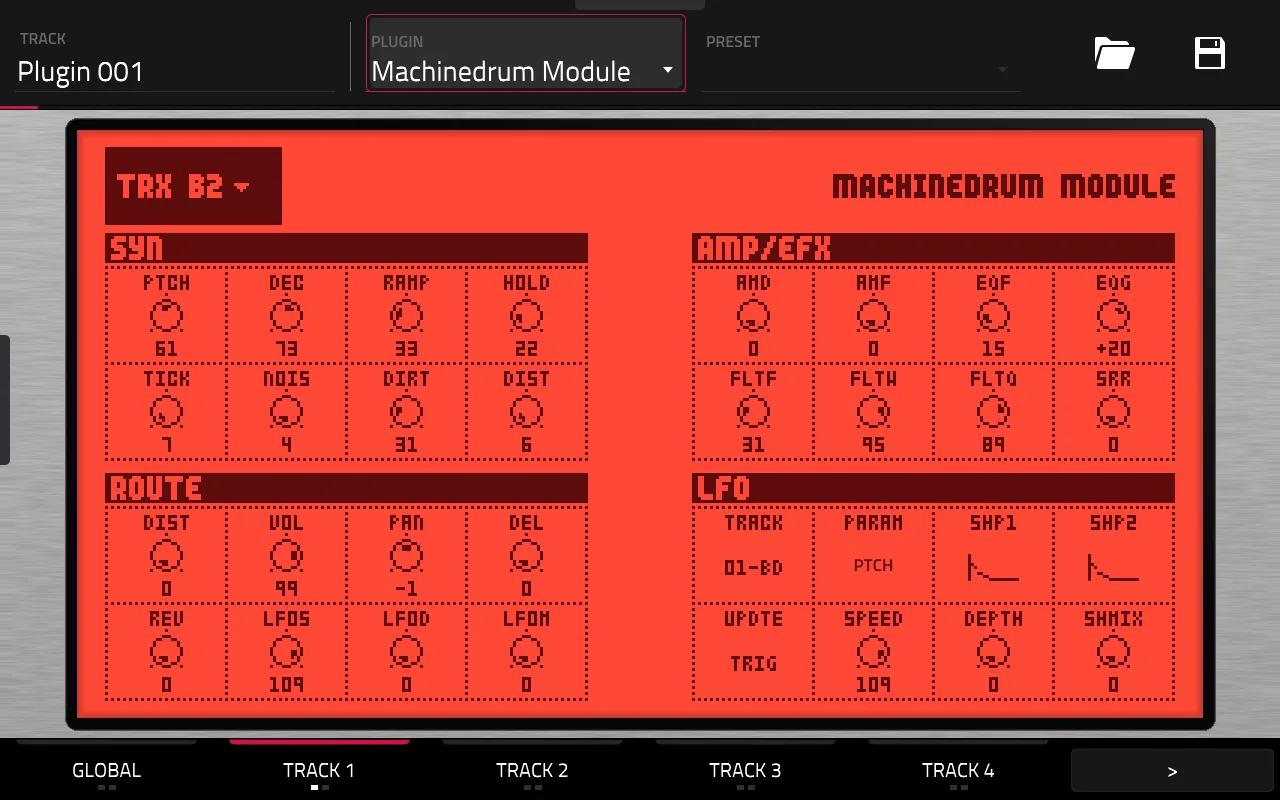
About
Highlights
- 16 tracks in one instance, MIDI notes 36 to 51 play tracks 1 to 16
- GND, TRX, EFM, E12, P-I and ROM machines
- Touchscreen pages for synth, amp and effects, routing and LFOs, with Q-Link support
- Factory kits and your own kit .syx files
- Taps: each track or send on its own MPC track
What you need
An MPC OS 3.x standalone device with root access (developed on a Force), your own Machinedrum OS 1.63 file and ideally a flash image of your own UW for the ROM machines and factory kits. You build the installer with one script on macOS or Linux with Docker.
Good to know
There is no downloadable build, because it contains your firmware. Tested on a Force with MPC OS 3.9.1. The Machinedrum's master reverb and delay are not built in, the sends come out through the taps. Don't share built files.
README
Machinemodule for MPC OS
💬 Questions or feedback? Join the Open MPC Discord.
Requires MPC OS 3.x. MPC OS 2.x needs further development: the touchscreen skins do not draw there yet (the page stays empty). See MPC OS 2.x vs 3.x in the main repo.
The Elektron Machinedrum SPS-1 UW sound engine as a native VST2 instrument for Akai MPC OS standalone devices (built and tested on the Force), with its own touchscreen skin and Q-Link support. All 16 Machinedrum tracks play from one plugin instance, using the Machinedrum's own DSP code and its own machine, LFO and mixer maths.
v0.3.4. It plays, saves and reloads with the project, and it is tested on a real Force (MPC OS 3.9.1). There is no downloadable build: it needs your own Machinedrum firmware, so you build the installer yourself with one script (see Building). The Machinedrum's master effects are not built in: the reverb and delay sends come out through the new taps instead (see Taps).
Not affiliated with Elektron. Nothing of Elektron's is in this repository or distributed from it; the plugin needs your own Machinedrum OS 1.63 file, and ideally a flash image for the ROM machines and factory kits (see What you need).
Features
Faithful to the Machinedrum
The sound comes from the Machinedrum's own code, not a re-creation of it:
- The voices are the Machinedrum's own DSP program, run in the dsp56300 emulator (the same emulator as gearmulator-md-mm, here with a static recompiler for ARM). Checked sample for sample against gearmulator-md-mm, which boots the whole Machinedrum; the build refuses to make a plugin if the recompiled DSP differs from the plain emulator by a single sample.
- The machines' parameter maths is the OS's own code: each machine's coefficient function, the parameter smoothing and the per-track LFO run from your OS file in a 68k emulator, and produce exactly the words the real ColdFire sends to the voice DSP.
- The track effects and the mix are a bit-exact C++ translation of the Machinedrum's mixer DSP: AMD, EQ, both filters, SRR, distortion, VOL, PAN and the reverb/delay sends (millions of samples compared with the DSP's own code, identical).
- 16 tracks, one instance. MIDI notes 36-51 play tracks 1-16 (the Machinedrum's own note-to-track map); notes 0-15 also play tracks 1-16 (what the optional MPC OS drum-pad patch sends).
- The machines: GND, TRX, EFM, E12, P-I and the ROM sample machines. The others have been dropped.
- Every parameter page of the hardware, per track:
- SYN: the eight synth knobs, with the machine's own labels, which change live with the machine.
- AMP/EFX: AMD, AMF, EQF, EQG, FLTF, FLTW, FLTQ, SRR.
- ROUTE: DIST, VOL, PAN, DEL, REV and the LFO amounts.
- LFO: the Machinedrum's per-track LFO, with its destination shown by name.
- Kits. The 16 factory kits (extracted from your own flash image at build time), plus any Machinedrum kit
.syxyou drop in (see Kits). A new instance starts on the first kit. - The skin is drawn from the Machinedrum's own LCD (fonts, dials, page layout), generated at build time from your own firmware, inside a thin hardware-style bezel. Nothing captured from the firmware is stored in the repo.
Different from the Machinedrum, for MPC (tuned for the Gen 1 Force)
A first-generation Force has four slow ARM cores shared with MPC itself, so some things are added, left out or changed:
- No master effects. The Machinedrum's master section (rhythm echo, gate box/reverb, EQ, dynamix) is not included. The reverb and delay sends come out through the taps (below) so MPC's own effects can do that job.
- Taps: each track or send on its own MPC track (added; see below). The Machinedrum's individual outputs become separate MPC tracks, submixes or return tracks to be processed by MPC OS insert effects.
- Voice budget, default 6 (added). The VOICES knob on GLOBAL is a CPU budget, not a plain voice count. Most machines cost 1 unit and the ROM (sample) machines cost 2, matching what they cost the Force's CPU. When a trigger would go past the budget, the oldest sounding track is cut, tail included. The real Machinedrum always plays all 16 tracks.
- Silence release (added). A track whose sound has died away (below -96 dBFS for 100 ms, under the plugin's 16-bit output) stops using CPU until it is played again, and stops counting against the budget. A hit after that sounds the same as a normal retrigger (noise-based machines start a fresh noise sequence, as any two hits differ anyway).
- The voices render on three threads (the real Machinedrum has one voice DSP). Each thread runs its own copy of the voice DSP for some of the tracks, balanced by what they cost.
- ROM on/off switch (GLOBAL, on by default). Off, tracks on a ROM machine stay silent and the randomiser leaves ROM machines out; each track keeps its ROM setting. The quickest way to make a busy kit safe.
- Randomise (GLOBAL): machines on all tracks, tracks 1-8, tracks 9-16, or a random kit.
- GLOBAL tab: a 16-track level mixer, VOICES, ROM, randomise, and the bank and kit selectors.
- Tempo follows MPC's, so the LFOs stay in time with the project.
- 8.7 ms of added latency: the engine renders 3 blocks ahead, which rides out the stalls MPC's own audio threads cause.
- Not offered: RAM, INP and MID/CTR machines (no sampling, no audio input and no MIDI output here); a kit that uses one shows a blank bar. No sequencer: MPC plays the notes.
Taps: each track or send on its own MPC track
MPC gives a VST2 instrument only one stereo pair of outputs, so the Module cannot offer 16 outputs. Instead, two small extra plugins read channels from the Module running in the same project:
- Machinemodule Tap (an instrument) and Machinemodule Tap FX (an effect, for a return or FX track). Each has an on/off cell for every track (mono, after the track's effects and VOL, before its pan), for the reverb send and for the delay send. Turn on as many as you like: the tap outputs their sum, so one MPC track or submix can carry any set of Machinedrum channels. Tap FX also has THRU, which adds whatever the track receives.
- A track that a tap reads leaves the Module's own dry main mix, so it is not heard twice. It still feeds the Machinedrum's reverb and delay sends (the track's REV and DEL knobs), which the send taps carry.
- Use them to give each drum its own MPC track, submix and insert effects, or to put the sends on a return track and run them through MPC's own reverb and delay. Taps are sample-aligned with the Module (measured on a Force) and cost almost no CPU.
- Needs one Machinemodule in the project; a tap is silent without it. The build makes an installer zip for each tap next to the Module's (see Building).
New in 0.3.4: saving and reloading now keeps your kit. A saved MPC project, program or plugin preset used to come back empty, because the plugin never handed MPC its state. It now stores all 16 tracks (machines and every knob), the kit and bank selection, so a reload restores the sound exactly.
New in 0.3.3: the flash image is now optional. Build with just your OS .syx and you get every machine except the ROM sample machines (their tracks stay silent) and no factory kits; give the script the flash image as well for those. The sound of a full build is unchanged.
New in 0.3.2: the two tap plugins now have their own installer zips, made by the same build as the Module's, and
-d installs all three. Each plugin lives in its own folder; a tap finds the Module wherever it is installed.
New in 0.3.1: much less crackle when you play it live. A drum that has died away (below -96 dBFS for 100 ms) now stops using CPU until it is played again; before, every track you had hit kept costing its full CPU time. The voices render on three threads instead of two. New instances start at VOICES 6 with ROM machines on (projects you saved keep their own settings). The GLOBAL page now has VOICES and ROM on the top row and the four randomise toggles below.
New in 0.3.0: Machinemodule Tap and Machinemodule Tap FX: extra plugins that put any tracks, and the reverb and delay sends, on their own MPC tracks, submixes or return tracks, so MPC's mixer and effects can process them. Tracks and sends can be mixed freely on one tap. Timing against the main output was measured on a Force (sample-aligned). The Module itself is unchanged, and its output is bit-identical when no tap is in use.
New in 0.2.1: build fixes only. The build no longer needs Monomodule's art file (the LCD fonts come from your Machinedrum OS, and the
randomise toggle icon is now drawn by this project), mdProbe is built for you, and the README has plain steps including a macOS setup.
The skin's look is the same apart from two small digits and that icon. If you do have mpc-vst-monomodule's vst/build/art.json next to this repo (or MNM_ART pointing at it), the skin build uses it and gets the original toggle icon and digits.
New in 0.2.0: the voices now render on two threads, which is the main reason a busy kit holds up better; the VOICES budget really cuts voices now (it did nothing before); TRX XT, CP, MA, CL and XC and EFM CY now play (they were silent); ROM machines are off until you switch them on; new instances start at VOICES 4 with an 8.7 ms buffer. Every machine the plugin offers is checked to make sound as part of the build.### Known limits
- CPU. About 6 voices can sound at once on a busy Force (fewer with ROM machines): a voice costs roughly 0.3-0.9 ms of a 2.9 ms audio block depending on the machine (ROM, P-I and EFM cost the most) and on how busy MPC is. Beyond that the plugin crackles; the voice budget is the guard. The engine threads run below MPC's own audio threads, so overload drops the plugin's own blocks (crackle) rather than MPC's audio or its screen.
- First load is slower than later ones (the skin is large: MPC reads and decodes it from the card).
- ROM machines are silent unless the sample data was extracted at build time (it is, if you build with your flash image). ROM33-48 are empty on the factory image.
Roadmap
- Faithful build for faster devices (Gen 2 and later): the Machinedrum's master effects built in (about 13 M DSP instructions a second more than the voices), and no voice budget.
- More voices on Gen 1: hide the OS tick behind the voice rendering (about 190 us of each 2.9 ms block), cut each voice thread's fixed cost, and better recompiled DSP code (2.1x the plain emulator today; 3.8x was reached for the Monomachine).
- Bank and kit picker list like the machine one (today: arrows).
- Open checks: ROM machine output is not yet verified bit-exact against the emulated Machinedrum, and TRX SD renders differently in this project's dsp56300 fork than in gearmulator-md-mm's after two blocks (which one matches the hardware is not known yet).
What you need
-
An MPC OS standalone device (developed on a Force; other MPC OS devices use the same plugin host).
-
Your own Machinedrum OS 1.63
.syx(Elektron_SPS1-1UW_OS1.63.syx). This is the sound engine. It is still a free download from Elektron's website (the Machinedrum support/downloads page), so it is the easy one to get; the flash image below has to come from your own unit. -
Your own full flash image of a Machinedrum UW (8 MB
.bin), used once at build time. It holds the ROM machines' samples and the source of the factory kits; the OS.syxhas neither. What it adds, and what you lose without it:With the flash image Without it GND, TRX, EFM, E12, P-I machines yes yes ROM sample machines (kicks, snares, hats, cymbals, claps and so on) yes silent The 16 factory kits yes none (start from an empty kit, or load kit .syxfiles)Your own kit .syxfilesyes yes (the non-ROM machines in them play) Tracks and the plugin all work the same all work the same Build without it by leaving the second argument off:
release/build_release.sh "<OS .syx>"(tested on a Force: the non-ROM machines play, ROM machine tracks stay silent). The ROM machines also cost twice the CPU of the others, so a flash-less build is a lighter one. -
A computer to build on (macOS or Linux; Windows through WSL) with Docker running, plus
git,cmake,ninjaandpython3. That's all: the build fetches everything else itself (the shared VST wrapper, the emulator sources, themdProbetool) and reads the LCD fonts from your Machinedrum OS file, so no other Elektron file is needed.
On a Mac (one-time setup)
- Install Apple's command line tools (compiler, git, python3): open Terminal and run
xcode-select --install. - Install Homebrew, then run
brew install cmake ninja llvm. - Install Docker Desktop and start it (the whale icon in the menu bar must be running before you build). Apple Silicon and Intel Macs both work.
- Put the two files in a folder whose path has no spaces, for example
~/md/. In Terminal, drag a file into the window to type its path; keep the quotes and the slashes as Terminal writes them. - The build takes about 25 minutes and the first run also builds
mdProbe(a few extra minutes). It needs about 10 GB of free disk space (Docker images). Keep the Mac awake. - macOS-specific notes: the script uses the tools Homebrew installed (
llvmsupplies thenmthe recompiler step needs). If a step fails, copy the last 20 lines of Terminal output into an issue: that is enough to find the cause. The Mac path has had less testing than Linux.
Building
The build reads your firmware and writes an installer zip containing the plugin, the skin, your extracted kits and ROM samples, and your OS file (the plugin reads it at run time); the result contains firmware-derived code and data, so it is for your own devices only. You don't need to be a programmer: do the steps in order and run the check after each one. (The site's Build page describes the general process for every build-it-yourself plugin.)
Where to run this: on your own computer, not on the Force. The build runs inside Docker on your computer, and so does
the git clone. The Force is only where the finished plugin is installed.
Step 1: Get your files and your device's address
- Download the Machinedrum OS 1.63
.syx(free, from Elektron's website) and, optionally, make or find your Machinedrum UW flash image.bin(see "What you need" for what it adds). - Put them in a folder whose path has no spaces, for example
~/md/. - Find your device's IP address (on the Force/MPC: Menu, Preferences, Network; it looks like
192.168.1.44), on the same network as your computer. Check SSH:ssh root@<device-ip>should log in (typeexitto leave). If it times out, see "Check that you can reach your device" on the Install page.
Step 2: Set up your computer (one time)
- Open a terminal. macOS: the Terminal app (then do "On a Mac" above). Ubuntu: Ctrl+Alt+T. Windows: install Ubuntu in
WSL 2 (
wsl --installin an administrator PowerShell, restart, open "Ubuntu") and work in your Ubuntu home folder (cd ~). - Install the tools. Ubuntu/WSL:
sudo apt update && sudo apt install git cmake ninja-build python3. Check:git --version,cmake --version,ninja --versionandpython3 --versioneach print a version. - Install Docker (Docker Desktop on macOS/Windows, and start it;
Docker Engine on Ubuntu, then
sudo usermod -aG docker $USERand log out and back in). Check:docker run --rm hello-worldprints a welcome message. - Make sure you have about 10 GB free disk space, and keep the computer awake: the build takes about 25 minutes, plus a
few more the first time (it builds
mdProbe).
Step 3: Build
git clone --recursive https://github.com/sd88me/mpc-vst-machinedrum.git
cd mpc-vst-machinedrum
release/build_release.sh "/path/to/Elektron_SPS1-1UW_OS1.63.syx" "/path/to/flash image.bin"   # the flash image is optional
Put both file paths in quotes. Watch for the == 3/7 ... step headings; at the end you have three installer zips in dist/:
Machinemodule-<version>-mpc-armv7.zip and one each for the two taps, Machinemodule-Tap-... and Machinemodule-Tap-FX-...
(install the ones you want; the taps need the Module).
Step 4: Install on the device
- Save your project on the device. Installing stops and restarts MPC, once per zip, and the device should be idle.
- Either re-run the build with
-d <device-ip>(finished work is reused, so this is quick) to copy all three zips over and run their installers, or install a zip yourself: copy it to the device, unzip it there and runinstall.shas root, or drop it into the installer app. - On the device, add Machinemodule on a track from the plugin browser. Save and reload a project once to check.
Options
-v <version> (default from git describe), -d <device-ip> (copy all three zips over and run their installers),
-m <mpc-vst-plugins checkout> (default: fetched automatically, or ../mpc-vst if it exists). MDPROBE=<path> uses a
ready-built mdProbe; otherwise tools/mdtrace/build_mdprobe.sh builds it the first time (you can also run that by hand).
-p is the advanced MPC OS patch below (off by default).
What the build does, and if something goes wrong
The script builds, in order: the x86 helper tools, the factory kits and ROM samples (by booting the emulated MD from your flash image), the recompiled voice DSP (traced from your OS file), a bit-exactness gate (the recompiled DSP must give the same audio hash as the plain interpreter, ROM machines included, and every machine the plugin offers must make sound, or nothing is built for the device), the skin, the ARM plugin, and the installer zip.
The script stops at the first error and says which step. Fix what it names and run it again; finished work is reused.
| You see | Usually means |
|---|---|
docker: permission denied |
Your user isn't in the docker group yet: run the usermod command above, log out and in. |
Cannot connect to the Docker daemon |
Docker isn't running: start Docker Desktop (or sudo systemctl start docker). |
ssh: ... timed out / Permission denied |
Wrong IP, different network, or SSH not reachable; see Step 1. |
| Stops at the bit-exactness gate | Wrong OS file or version. Use Machinedrum OS 1.63. |
| A file is "not found" | A space or typo in a path: put paths in quotes, or move the files to a folder without spaces. |
Still stuck? Ask on the Open MPC Discord, or open an issue with the last 20 lines of output. HANDOFF.md has every step's details.
Advanced (optional): 16 drum pads, by patching MPC OS
Without this, MPC gives Machinemodule a melodic (keyboard) pad layout; play tracks 1-16 with notes 36-51. MPC gives the
drum-pad layout only to its own DrumSynth plugin, with 8 pads. release/mpc_patch/ is an opt-in patch that gives
Machinemodule the drum layout with 16 pads, all lit red (close to the Machinedrum's LCD), pad n playing track n.
Read this first:
- It modifies the factory MPC OS (
/usr/bin/MPC) on your device. Use it at your own risk. - It works on MPC OS 3.9.1.2 only. It checks the exact file (md5) and refuses anything else without changing it.
- A firmware update replaces the file and removes the patch. Re-run it after updating; it will refuse until this project supports the new version.
- Side effect: Akai's DrumSynth Multi also gets 16 red pads (only 1-8 make sound). The patch colours every plugin drum program the same; telling plugins apart at colour time needs the program's identity, which isn't reachable from the colour code (see the handoff).
- Undo:
sh uninstall.shputs the original bytes back (it falls back to the full backup if needed).
Nothing of Akai's is in this repo: the patch file holds only our own bytes, their offsets and md5s, and your device
patches its own copy. Before writing, install.sh backs up the original to /sdcard/MPC-backup/ (112 MB) along with
the original bytes it changes, stops MPC, writes about 180 bytes, checks the result, and restarts MPC. If the check
fails, it restores the original at once.
To use it: build with -p (and -d <device-ip> to run it on the device; you type PATCH to confirm), or copy
dist/mpc-os-patch/ to the Force and run sh install.sh as root. Then add Machinemodule on a new track (pad
colours are set when the track is created).
If MPC doesn't start after patching, SSH still works: run sh uninstall.sh, or copy
/sdcard/MPC-backup/MPC-3.9.1.2.orig over /usr/bin/MPC with the root filesystem remounted read-write.
Details: docs/HANDOFF-mpc-drum-pads.md.
Kits
Put Machinedrum kit sysex files (.syx, the MD's own kit dump) in
/sdcard/vst/machinedrum/kits/ or in Force Documents/Machinedrum Kits/. They are picked up within a few seconds.
Each file is a bank; a file with several kits shows them all. The factory kits are the bank called FACTORY.
Master-effect settings inside a kit are ignored for now.
Plugin catalog
This is a build-it-yourself plugin: the installer zip contains firmware-derived code and data, so it is built per user and
must never be published as a release (a catalog entry for it links to this repo and its build instructions, not to a
download). The zip is still catalog-conformant in format: mpc-plugin.json (id machinemodule, license
AGPL-3.0-only, source repo) is generated, and the build runs mpc-vst-plugins' catalog_check.py --catalog as its last step.
The plugin locates its data next to the .so (MODULE_SUBDIR), not at a fixed path. Device testing is recorded in
tested.json (v0.3.2: Akai Force, MPC OS 3.9.1).
How it works
The Machinedrum has a ColdFire processor for the sequencer and UI, and two DSP56303 chips: DSP2 renders the 16 voices and DSP1 runs the per-track effects, the mix and the master effects. We keep only the sound path:
- Voices: DSP2's program runs unmodified from your OS file in the dsp56300 emulator, with a small harness in place of the hardware's DMA and serial loop. All 16 voices render in one block.
- The ColdFire side is a C++ host model: the OS tick (smoothing, LFOs, triggers, mixer inputs) with the OS's own machine coefficient routines run in a 68k emulator, so the maths is the hardware's.
- Per-track effects and the mix (AMD, EQ, filters, SRR, distortion, pan, sends) are a native C++ translation of DSP1's code, checked sample by sample against the DSP running the original.
- Speed on ARM: the DSP program is statically recompiled ahead of time (from your OS file, so it is never shipped) into C++ that the ARM compiler can optimise.
Development
The work behind this, in order (HANDOFF.md has the full log and docs/ the protocol notes):
- Firmware decoded. The OS
.syxunpacks into five sections, two of them complete DSP programs. - Protocol traced. A patched full-system emulation logged every word between the ColdFire and the DSPs. That settled the roles (section 1 on DSP2, section 2 on DSP1), the 16 voice slots and the parameter structures.
- Voice engine, bit-exact against the full-system emulation, then the host model (tick, LFOs, triggers).
- Mixer chain translated to native C++, bit-exact against the DSP for 3.2 M samples of the per-track chain and 384,000 words of the mix.
- ARM port of the DSP emulator. Found and fixed a missing MERGE instruction, a static-initialisation-order bug in the opcode tables and a cache-invalidation gap in the boot loader, and proved the ARM output identical to x86 on the real Force.
- Static recompiler for the voice DSP: 294% to 141% of real time for a 6-track demo on the Force.
- The plugin: engine thread with real-time scheduling, 524 parameters, SYN labels that follow the machine, project save and restore.
- The skin, generated from the real LCD driven in the emulator: font and dial atlases, page layouts, a machine picker, the LFO page, chassis and bezel.
- Kits and ROM machines: kit sysex import (factory kits dumped from the emulated MD), and the sample memory the MD copies from its flash at boot.
- Performance work on the device (0.1): skipping settled silent tracks, ring depth and priority tuning, trimming the skin and P memory (about 225 MB less RAM in MPC), the voice budget, skipping idle voices in the DSP loop and silent tracks in the mixer.
- 0.2: voices on two threads with the track effects on the same threads, cores chosen by how busy MPC keeps them, a voice budget that really cuts, cost-balanced voice groups, and fixes for machines that stayed silent (found by comparing every machine against the emulated Machinedrum).
Credits
- Elektron, for the Machinedrum. All firmware and sound belong to them; this project ships none of it.
- shnolk's Monomodule: the approach this follows (the machine's own
DSP in an emulator, a host model for the main processor, plugin and skin design), the OS-file decoder adapted in
tools/mdfw, and the Elektron LCD fonts and dial art the skin borrows. - gearmulator-md-mm by Joe Landers: a full-system Machinedrum emulation, used as the tracing and correctness reference, and the Musashi 68k core inside it, used by the machine routines. Not part of the plugin.
- dsp56300, the DSP56300 emulator this builds on (our fork, sd88me/dsp56300, adds the ARM interpreter and static recompiler work and the fixes above), and its bundled asmjit.
- mpc-vst-plugins: the shared VST2 wrapper, skin toolchain and installer for MPC OS.
- Built with Claude Code.
Licensed AGPL-3.0-only, like Monomodule (whose decoder is adapted here); dsp56300 is GPL-3.0.
Pictures in the README load from GitHub.
What's New
The project is now Machinemodule (was Machinedrum Module); the taps are Machinemodule Tap and Machinemodule Tap FX. Plugin ids and the repo name are unchanged, so it replaces the old entries on install.
The advanced, optional MPC OS patch (release/build_release.sh ... -p) now matches the new plugin name, so rebuild it and uninstall any older patch first. Tested on the Force, MPC OS 3.9.1.2.
- Language
- C++
- License
- GNU Affero General Public License v3.0
- Stars
- 13
- Forks
- 4
- Created
- 09-27-2026
- Last commit
- 12 hours ago